Introduction
End users forget how fast you closed their ticket. They never forget how you treated them.
That's the reality Don Crawley built his entire career around. His take on IT work is simple: the goal is using technology to solve human problems in the workplace. You're not just fixing a printer or resetting a password. You're helping a stressed-out person get back to their job.
Here's the problem: most IT pros receive extensive training on tools, systems, and troubleshooting steps, but almost none learn how to talk to a frustrated human being. The result? Burned-out technicians, frustrated end users, and a help desk that feels like a battle zone instead of a support system.
This guide covers the mindset shift that changes everything and a five-principle framework you can start using today. You'll also find practical tips for tough conversations and strategies for building a help desk culture that keeps users coming back satisfied.
Key Takeaways
- Technical skill opens the door, but how you handle issues determines satisfaction
- The five pillars of great IT service are Competence, Compassion, Empathy, Listening, and Respect
- Small habits, like naming frustration and following up, build lasting user trust
- What's routine to you may feel urgent to the person experiencing it
- Organizations that formalize customer-service training see real gains in satisfaction and retention
Why Customer Service Skills Matter More Than Ever on the IT Help Desk
Don Crawley puts it this way: IT professionals exist to craft creative technical solutions to perplexing human problems, not just to manage machines. That distinction changes how you should approach every single ticket.
A fast technical fix and a satisfied user aren't the same thing. You can resolve an issue in three minutes flat and still leave someone irritated if you were curt, dismissive, or made them feel stupid for asking. Speed matters, but tone matters just as much.
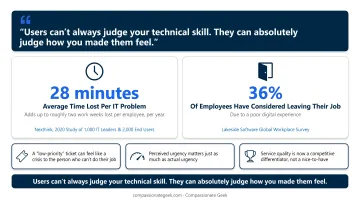
Consider the scale of the problem IT teams are solving. Nexthink's 2020 study of 1,000 IT leaders and 2,000 end users found that employees lose an average of 28 minutes per IT problem, adding up to roughly two work weeks lost per person, per year.
That's friction users feel constantly, whether or not they ever file a ticket about it.
This friction has consequences beyond productivity. Lakeside Software's global workplace survey found that 36% of employees had considered leaving their job because of a poor digital experience. Poor tech support doesn't just annoy people. It contributes to turnover.
A few things every IT pro should internalize:
- A "low-priority" ticket in your queue can feel like a crisis to the person who can't do their job
- Perceived urgency matters just as much as actual urgency
- For MSPs and internal IT teams alike, service quality is now a competitive differentiator, not a nice-to-have
Users can't always judge your technical skill. They can absolutely judge how you made them feel.
The 5 Core Principles of Exceptional IT Help Desk Customer Service
Compassionate Geek's five-principle framework answers the question IT pros ask most often: what actual skills do I need beyond technical training? The five principles are Competence, Compassion, Empathy, Listening, and Respect.
Competence
Technical knowledge is still your entry ticket. No amount of warmth fixes a wrong answer.
Users trust technicians who know what they're doing. Real competence takes ongoing practice, not a one-time credential.
One common failure mode: a technician interrupts the user thirty seconds into the call, convinced they've already diagnosed the problem. That's overconfidence masquerading as expertise, and it usually leads to a misdiagnosis.
Real competence looks different. In one internal case, a plugin's reporting feature broke with no obvious cause. It took weeks of methodical digging before someone found a hidden toggle buried deep in the settings, one click, problem solved.
That's what competence actually requires: patience, investigation, and a willingness to keep digging instead of guessing.
It also means knowing your limits. Even seasoned engineers ask a colleague to double-check risky changes before pushing them live. Staying current on your systems and resolving issues on the first contact is how you earn trust.
Compassion
Compassion means caring about the person's experience, not just closing the ticket.
Say a user reports the same network issue for the third time this month. The instinct is to jump straight into troubleshooting. The compassionate move is to pause first: "I understand why that's frustrating." That one sentence validates the person before you touch the technical problem.
Compassion is the difference between fixing a machine and helping a human who happens to have a machine problem.
Empathy
Compassion is caring. Empathy is naming what someone feels before you try to fix anything.
Empathy means recognizing that a user is frustrated, confused, or worried, and saying so out loud instead of skipping straight to the solution. A line like "I can hear how frustrating this must be, especially with a deadline coming up. Let's get this fixed" acknowledges the emotion first. Only then do you move into action.
Skipping this step doesn't make you faster. It just makes users feel unheard.
Listening
Active listening means hearing more than words.
Tone, pace, and emotional cues tell you the real urgency behind a request, sometimes more accurately than the words themselves. A user who says "it's not a big deal" in a tight, rushed voice may be more stressed than someone who calmly reports a major outage.
Practical habits that build this skill:
- Let the user finish explaining before you start troubleshooting
- Ask clarifying questions instead of assuming you already know the issue
- Adjust your pace and tone to match the emotional register of the call
Respect
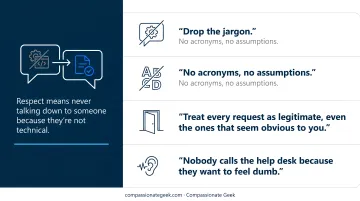
Respect means never talking down to someone because they're not technical.
Drop the jargon. If you're explaining a fix to an end user, use plain, step-by-step language, no acronyms, no assumptions. Save the technical detail for conversations with other technicians.
Treat every request as legitimate, even the ones that seem obvious to you. Nobody calls the help desk because they want to feel dumb.
Practical Customer Service Tips IT Pros Can Use Today
Principles matter, but habits are what users actually experience. Here are six you can start using on your very next ticket.
- Use their name, skip the script. Stop treating end users like ticket numbers. Acknowledge their specific situation instead of reciting a canned response.
- Apologize without blame. Say "I'm sorry this is happening" even when it wasn't your team's fault, and avoid any hint of "well, if you had just..."
- Communicate proactively. Send plain-language status updates before users have to ask, especially during known outages or major incidents.
- Be honest when you don't know. "I don't have the answer yet, but I'm finding out" builds more trust than false confidence ever will.
- Follow up after the fix. A quick check-in 24 hours later confirms the issue actually stayed resolved and catches repeat problems before they become complaints.
- Act on feedback, good and bad. Regular feedback loops surface training gaps and process fixes you'd otherwise miss.
None of these require new tools or budget. They require attention and repetition until they become habit.
Common IT Help Desk Problems That Test Your Customer Service Skills
The tickets that dominate your queue aren't exotic. Fixify's 2026 benchmark, based on more than 50,000 analyzed tickets, found that Software & Applications issues alone made up 38.2% of ticket volume, with Onboarding & Offboarding, Identity and Access Management, Collaboration tools, and Hardware accounting for most of the rest.
| Category | Share of tickets |
|---|---|
| Software & Applications | 38.2% |
| Onboarding & Offboarding | 16.6% |
| Identity & Access (logins, MFA) | 15.9% |
| Collaboration tools | 11.7% |
| Hardware | 8.4% |
That means the majority of your day involves problems you've solved a hundred times before. The real risk is tone: sounding bored, rushed, or dismissive on ticket #500 of the week.
A few ways to keep responses efficient without going robotic:
- Use knowledge base answers and canned responses as a starting point, then personalize before sending
- Reference the user's specific situation, even briefly, so the reply doesn't read like a form letter
- Acknowledge the inconvenience briefly, even for a two-minute fix, so the user feels heard, not processed
A patient, fresh tone on a routine reset costs you nothing extra and pays off in trust every time.
Building a Customer-Centric Help Desk Culture
Culture change starts at the top. Leadership has to model compassionate behavior, not just approve a training budget and move on.
That kind of leadership modeling only sticks when it's reinforced by formal training. HDI's frontline support curriculum confirms that structured customer-service training, covering communication, listening, and relationship management, is an established practice in support organizations rather than a fringe idea. Pairing that kind of training with technical certifications gives technicians both halves of the job they're actually asked to do.
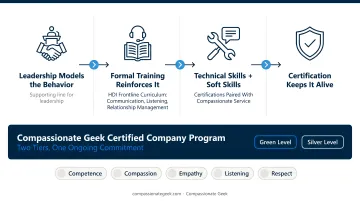
Formalizing this commitment is exactly why the Compassionate Geek Certified Company Program exists. Certification is a structured, ongoing commitment: it keeps the five principles alive well after the initial training session ends.
Frequently Asked Questions
What are the most common IT help desk problems?
Password and account access, software glitches, slow systems, and connectivity issues make up the bulk of daily ticket volume. Software and identity-related requests alone typically account for well over half of all tickets.
What skills are needed for IT help desk customer service?
You need technical competence plus four interpersonal skills: compassion, empathy, active listening, and respectful communication. Technical skill without the human element leaves users unsatisfied even when the fix works.
How can we improve IT help desk customer service?
Start with proactive status updates, blame-free apologies, and consistent follow-up after resolution. Layer in regular feedback collection and ongoing soft-skills training to close gaps fast.
How do the 5 P's of customer service apply to an IT help desk?
Different sources define the "5 P's" differently; some use Purpose, Passion, People, Platform, and Proactivity. Compassionate Geek's IT-specific version, Competence, Compassion, Empathy, Listening, and Respect, is built specifically for technical support work.
How do I handle an angry or frustrated end user on the help desk?
Acknowledge the emotion first, before touching the technical issue. Apologize without assigning blame, then pivot immediately to next steps rather than explaining what went wrong.
What is the difference between a help desk and a service desk when it comes to customer service?
A help desk handles immediate technical issues like access, hardware, and software problems, and tends to be reactive. A service desk covers broader IT service delivery across the organization. Both rely on the same human-centered principles.