That's the two-fold problem with most help desk training manuals. Some cover only technical steps and produce competent-but-cold technicians who solve tickets without building trust. Others skip structure entirely, leaving new hires to piece things together from whoever happens to be free that day. Neither approach scales.
This guide breaks down what actually belongs in a help desk training manual, how to organize it, and how to make sure your staff use it instead of letting it collect dust in a shared drive.
Key Takeaways
- Effective manuals blend technical procedures with customer service and emotional intelligence training
- A clear structure across skills, SOPs, and escalation speeds onboarding and cuts inconsistency
- Empathy and active listening require role-play practice, not just written instructions
- Review manuals regularly as tools, policies, and agent feedback evolve
What Is a Help Desk Training Manual And Why Does It Matter
A help desk training manual is a structured internal document that combines step-by-step technical procedures, company policies, ticketing workflows, and customer interaction standards. Its job is to onboard new support staff and keep existing agents sharp as tools and processes evolve.
Skip the formal manual, and you get predictable problems:
- Inconsistent troubleshooting quality that varies from one technician to the next
- Slower ramp-up time for new hires who have no reference point
- Reliance on tribal knowledge that walks out the door when an employee leaves
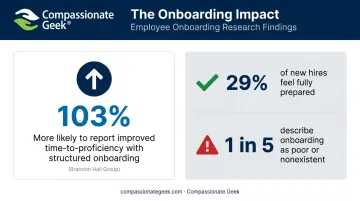
The data backs this up. Organizations that connect onboarding with structured learning and development are 103% more likely to report improved time to proficiency, according to Brandon Hall Group's 2024 research on onboarding strategy. That's roughly double the odds of getting new hires productive faster.
Separately, Gallup found that only 29% of new hires feel fully prepared and supported after onboarding, and nearly 1 in 5 describe their onboarding as poor or nonexistent.
Who Actually Needs One
A formal manual matters for internal IT departments, MSPs, and any help desk team scaling headcount where inconsistent service directly threatens customer retention. If you have more than two or three support staff, informal training doesn't hold up.
One distinction matters here: a training manual trains the person; a knowledge base supports the ticket. The manual teaches an agent how to think and communicate. The knowledge base gives them a specific answer for a specific issue. You need both, and they serve different purposes.
Essential Components Of An Effective Help Desk Training Manual
Every solid manual rests on four pillars: technical skills training, standard operating procedures, tools and systems documentation, and customer service standards. Skip any one of these, and gaps show up fast in ticket quality or agent confidence.
Technical Skills And Systems Training
This is the foundation most managers get right instinctively. Core content should include:
- Hardware and software fundamentals
- OS troubleshooting across Windows, macOS, and Linux
- Basic networking: IP addressing, DNS, connectivity checks
- Active Directory and user account management
- Remote support tool usage
Where most manuals fall short is delivery format. Written explanations alone don't stick.
A meta-analysis of 225 STEM education studies, published in the Proceedings of the National Academy of Sciences, found that active learning boosted exam performance by roughly 6 percentage points compared to traditional lecturing. Failure rates dropped too: 21.8% under active learning versus 33.8% under passive instruction.
Translate that into your manual: build in hands-on lab exercises and simulated ticket scenarios instead of relying only on written walkthroughs. A technician who practices resetting a locked AD account in a sandbox retains it far better than one who just reads the steps.
Standard Operating Procedures And Workflows
SOPs are where consistency lives or dies. Your manual should document:
- Ticket intake standards — what information gets captured and how
- Prioritization and severity criteria — what counts as urgent versus routine
- Escalation procedures — including exactly what context needs to travel with the ticket
A consistent documentation format matters more than it sounds. When every agent logs tickets the same way, handoffs between shifts and support tiers stop causing miscommunication. A vague ticket note costs the next technician ten extra minutes just figuring out what already happened.
Company-Specific Policies And Tools
Generic manuals miss the details that actually run your operation:
- Which ticketing or help desk platform your team uses, and how
- Internal contact points for escalations outside the help desk
- SLA commitments tied to each ticket priority level
- Compliance and security policies specific to your industry or client base
None of this is optional filler. A technician who doesn't know your SLA response window will make bad prioritization calls, no matter how technically sharp they are.
Customer Service Standards And Communication Skills
Technical accuracy means little if the interaction leaves the customer frustrated. Your manual should define:
- Tone and language guidelines for phone, chat, and email support
- Active listening techniques for de-escalating frustrated callers
- Empathy statements that acknowledge the disruption without over-apologizing
- Follow-up expectations once a ticket closes
Agents who master every technical step but skip these standards still generate complaints. Building both skill sets into the same manual, rather than treating soft skills as an afterthought, is what separates a good help desk from a great one.
Building The Customer Service And Soft Skills Foundation
Technical accuracy alone doesn't satisfy customers. A technician can close a ticket correctly and still leave the customer irritated because of how the interaction felt. This is where most manuals go thin, treating soft skills as an afterthought instead of a trained competency.
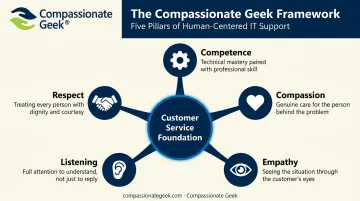
Closing that gap starts with a proven framework. Compassionate Geek, founded by Don R. Crawley, built its entire training methodology around five principles you can use directly in this section of your manual: Competence, Compassion, Empathy, Listening, and Respect.
- Competence means understanding a problem well enough to address it without arrogance — technical results plus how you treat people
- Compassion means recognizing that difficult behavior often comes from stress or fear, without excusing it
- Empathy requires seeing the situation through the customer's eyes, even when you disagree with them
- Listening means letting people finish talking before responding, then asking clarifying questions
- Respect means no sarcasm, no dismissive tone, applied equally to customers and coworkers
Teaching Plain-Language Communication
Non-technical users don't need jargon; they need clarity. Train agents to replace technical terms with plain-language analogies and visual aids. A phrase like "here's what we fixed and why it should stick" tells the user what happened without talking down to them.
Training Empathy And Active Listening
Empathy needs explicit instruction, not assumption. Rather than handing agents a rigid script, teach them to ask themselves: what would I feel and want if I were in this person's position? That mindset shift changes tone naturally.
For active listening, build these habits into your manual:
- Use a consistent greeting that sets a calm, professional tone
- Ask structured information-gathering questions before jumping to solutions
- Confirm understanding by summarizing the issue back before offering a fix
These habits take repetition to stick, and organizations without in-house expertise shouldn't guess at how to teach them. Structured programs like Compassionate Geek's IT customer service training build this section on real instructional design rather than borrowed scripts.
Best Practices For Implementing And Practicing Manual Skills
A manual that only gets read never changes behavior. The most effective rollout pairs reading with immediate, hands-on application.
Blended delivery works like this:
- New hires read a manual section
- They immediately apply it through a lab exercise or simulated ticket
- They get feedback before moving to the next section
For soft skills specifically, role-play exercises turn manual guidelines into muscle memory. Pair two agents and have them rehearse:
- Handling an upset customer who's already called twice about the same issue
- Clarifying a vague or unclear request
- Handing off an escalation with full context
Mentorship rounds out the model. Pairing new agents with experienced technicians for shadowing sessions lets trainees watch both the technical troubleshooting and the customer communication happen in real time, before they're on their own.
This isn't just intuition. Microsoft's internal pilot of 600 employees tracked how buddy check-ins during the first 90 days affected new hires' sense of productivity:
- One meeting: 56% felt productive quickly
- 4-8 meetings: 86% felt productive quickly
- More than 8 meetings: 97% felt productive quickly
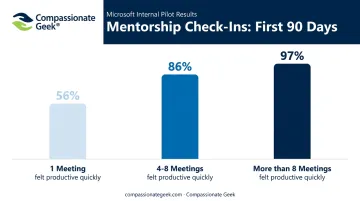
More contact with an experienced peer means more confidence, faster.
Keeping Your Training Manual Current And Measuring Its Success
A manual that reflects last year's ticketing platform isn't helping anyone. Set a review cadence — quarterly, at minimum, or immediately whenever tools, policies, or escalation procedures change.
Two feedback sources should drive updates:
- Agent feedback on sections that feel unclear or outdated
- Customer satisfaction trends that point to specific skill gaps
- Escalation logs showing repeated hand-offs or missed steps during complex tickets
Track outcomes tied directly to the manual, not just vague impressions:
| Metric | What It Tells You |
|---|---|
| Onboarding time-to-competency | Whether new hires ramp up faster after manual updates |
| First-contact resolution rate | Whether technical and communication training is sticking |
| CSAT trends | Whether soft-skills sections are translating to real interactions |
Industry benchmarks give useful context here. HDI's 2023 guidance puts a healthy first-contact resolution target at 70-80% for single-channel support. Aggregate IT service-center CSAT, meanwhile, sat at 73.1% for 2022-2023, down from 86.3% the year prior.
If your numbers are trending the wrong direction, that's a signal to revisit your manual's soft-skills content before assuming it's a staffing problem.
Frequently Asked Questions
What skills should an IT help desk training manual teach?
It should cover technical skills such as hardware, software, networking, and ticketing tools, alongside soft skills like communication, empathy, and active listening. Both matter equally for well-rounded support.
How can I practice skills from an IT help desk training manual?
Practice through hands-on labs, simulated tickets, role-play exercises for customer scenarios, and shadowing sessions with experienced technicians. Reading alone won't build the muscle memory needed.
How long should a help desk training manual be?
Length varies by team size and complexity. Focus on clarity and completeness for each core section instead of chasing a specific page count.
How often should a help desk training manual be updated?
Review it at least quarterly, or immediately whenever tools, policies, or escalation procedures change. Outdated manuals create more confusion than no manual at all.
What's the difference between a help desk training manual and a knowledge base?
A manual trains the agent's skills and behavior over time. A knowledge base stores specific solutions agents reference while actively working a ticket.
Who should be responsible for creating and maintaining the training manual?
Typically IT managers or L&D leads, built with input from senior technicians. For soft-skills content, specialized customer service trainers add credibility a generic template can't match.