Introduction
A new help desk hire shadows a senior tech for two weeks, then gets thrown onto the phones. Six months later, three other new hires go through the same scattered, inconsistent process—each learning different shortcuts, different tones, different habits.
Sound familiar?
This is how most support teams end up with wildly uneven customer experiences. One agent handles a frustrated caller with patience and clarity, while another escalates the same type of ticket because they never learned to de-escalate.
According to HDI's 2025 State of Tech Support survey, 55% of tech-support leaders struggle to find candidates with the right soft skills, and 39% cite gaps in technical ability.
Help desk training videos fix this by combining technical process training with the human skills that reduce escalations. This post covers what to include, how to build an effective program, and how to prove it's working.
Key Takeaways
- Effective help desk training blends technical skills with empathy, tone, and active listening
- Video training scales across shifts and locations without live sessions
- Strong programs follow a clear framework, not a random collection of tutorials
- Tracking metrics like first-call resolution and CSAT proves whether training works
What Are Help Desk Training Videos & Why They Matter
Help desk training videos are structured, on-demand video lessons that teach support staff both technical processes and customer interaction skills. Unlike a live training session that happens once and disappears, a video library sits there permanently, ready for a new hire's first week or a veteran agent's toughest call.
Why Video Works for Support Teams
Video training solves a specific operational problem: consistency across people, shifts, and locations.
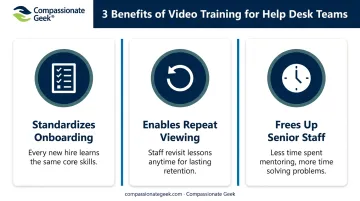
- Standardizes onboarding so every new hire learns the same escalation steps, tone guidelines, and ticketing workflow
- Allows repeat viewing at the exact moment an agent needs it, not just during a one-time orientation
- Frees up senior staff who would otherwise spend hours repeating the same explanations to each new hire
Corporate video training has become the norm rather than the exception. Over 90% of learning and development professionals surveyed by the eLearning Guild use video in some form to support workplace training.
The Soft Skills Gap Nobody Talks About
Here's the common pitfall: most organizations train the technical side thoroughly (ticketing systems, remote tools, escalation paths) and leave soft skills to chance. Patience, tone, and empathy get treated as personality traits instead of teachable behaviors.
That's a mistake. IT-specific soft skills training isn't the same as generic customer service coaching. A frustrated caller whose email server is down needs a different kind of reassurance than a retail customer with a billing question. The scenarios, vocabulary, and stakes are different, which is exactly why Compassionate Geek builds its training specifically around IT support situations.
Core Topics Every Help Desk Training Video Should Cover
A well-rounded video library needs two distinct tracks: technical process training and human-centered skills. Neither works well alone.
Technical & Process-Based Video Topics
These videos teach the mechanics of the job:
- Ticketing system usage — creating, categorizing, and closing tickets correctly
- Troubleshooting frameworks — a repeatable method for diagnosing issues instead of guesswork
- Escalation protocols — knowing exactly when and how to hand off a ticket
- Remote support tools — screen sharing, remote access, and diagnostic software
Scenario-based videos beat lecture-style content here. Watching someone walk through an actual ticket resolution, mistakes and all, teaches more than a slideshow ever will.
Soft Skills & Human-Centered Video Topics
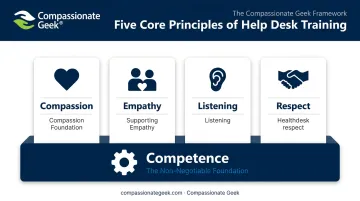
Compassionate Geek structures its curriculum around Five Core Principles: Competence, Compassion, Empathy, Listening, and Respect. Technical competence comes first because it's the non-negotiable baseline. The other four principles build the human layer on top of it.
Specific video topics under this track should include:
- Active listening techniques for phone and chat interactions
- De-escalating a frustrated or angry caller
- Tone and word choice in written communication
- Handling difficult customers without losing empathy
Blending both tracks in one curriculum produces better first-call resolution and stronger customer loyalty. A technically sharp agent who's tone-deaf still frustrates customers, while a warm agent who's technically lost can't actually solve the problem.
Structure matters too. Break the library into short, topic-specific modules of 5-10 minutes rather than one long session. Agents retain more when they can watch a single skill, practice it, and move on.
Benefits of Video-Based Training for Help Desk Teams
The case for video training comes down to three practical advantages.
Scalability. A support team with agents in three time zones doesn't need three separate live training sessions. Everyone accesses the same video library, at the same quality, on their own schedule. Compassionate Geek's Group Management Console, free with two or more seats, lets managers assign that training across every time zone from one dashboard.
Flexibility and retention. An agent facing a hostile caller for the first time can pull up the de-escalation video right before picking up the phone. That's reinforcement at the exact point of need—something a training session from three months ago can't offer.
Cost and time efficiency. Organizations shifting from live-only training toward blended, video-supported models see measurable gains. According to IBM's Value of Training report, top learning organizations using learning technologies reported a 22% reduction in learning-delivery time and a 12% reduction in time to competence.
For a growing help desk team, that translates directly into faster ramp-up and less senior-staff time pulled away from actual support work.
Best Practices for Creating or Choosing Effective Help Desk Training Videos
Building a video library isn't just filming a screen share and calling it done. A few principles separate effective programs from ones agents ignore.
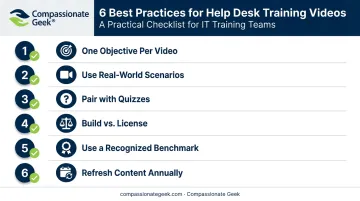
- Define one learning objective per video. A video covering ticket categorization and empathetic tone at once overwhelms new agents. Split them.
- Use real-world scenarios, not theory. Role-play demonstrations of an actual escalation call teach more than a bullet-point explanation of "what escalation means."
- Pair videos with quizzes or exercises. A short comprehension check after each module reinforces retention and gives managers a way to measure whether the content landed.
- Decide: build in-house or license existing content. Building a full library from scratch takes significant time and internal expertise in instructional design. Platforms like Compassionate Geek's on-demand portal already offer structured, proven IT customer service curricula (available in English, French, and Spanish) so teams can skip the development phase entirely.
- Consider a recognized benchmark. Programs such as the Compassionate Geek Certified Company designation give organizations an external standard to validate that their training actually meets a customer-service excellence bar, rather than relying on internal assumptions.
- Refresh content periodically. New ticketing systems, updated remote tools, and shifting customer expectations mean last year's video library can go stale. Review and update at least annually, or whenever a major tool changes.
For teams evaluating cost, Compassionate Geek's individual course license runs $299 per seat, with volume discounts available for larger teams. That pricing offers useful context when comparing the cost of building a library in-house versus licensing one that's already built and tested.
How to Measure the Effectiveness of Help Desk Training Videos
Training only matters if it changes outcomes, so track these metrics before and after rollout:
| Metric | What It Measures | Industry Benchmark |
|---|---|---|
| First-call resolution | Tickets resolved on the initial call | 70-80% is a good target (HDI, 2023) |
| Average handle time | Time spent per ticket or contact | Varies by ticket complexity |
| CSAT score | Customer satisfaction with the interaction | Industry standards have ranged from 73% to 86% year over year |
Engagement metrics matter too. Video completion rates and quiz scores tell you whether agents are actually absorbing the material or just clicking through to check a box. Low completion rates on a specific module often flag a video that's too long, too dry, or poorly timed in the curriculum.
Finally, don't rely on numbers alone; collect qualitative feedback directly:
- Ask agents which videos felt most useful in real situations
- Ask customers, through post-ticket surveys, whether the interaction felt helpful and respectful
- Watch for recurring complaint patterns that suggest a gap the videos aren't addressing
Combining hard metrics with direct feedback from agents and customers gives you a clearer picture of which videos are working and which ones need revision.
Frequently Asked Questions
What is the purpose of help desk training videos?
They standardize onboarding, teach both technical processes and interpersonal skills, and let agents learn at their own pace. This consistency directly improves service quality across shifts and locations.
How long should a help desk training video be?
Shorter, topic-focused videos of 5-10 minutes improve retention far more than long, all-in-one sessions. Agents absorb one skill at a time instead of losing focus halfway through.
What topics should be included in help desk agent training?
Cover ticketing and process skills alongside soft skills like empathy, active listening, and de-escalation. Leaving out either track leaves a real gap in agent performance.
Are video-based trainings more effective than in-person training for help desk staff?
Neither replaces the other entirely. Video offers flexibility and repeatability that live training can't match, making a blended approach the most effective option.
How often should help desk training videos be updated?
Refresh content whenever tools, processes, or customer service standards change—at minimum, review the full library annually to catch anything that's gone stale.
Can training videos really improve soft skills, not just technical skills?
Yes. Scenario-based videos that demonstrate real interactions, paired with practice exercises, can effectively teach empathy, tone, and listening skills over time.