This scene plays out daily at help desks everywhere. Ticket handling is the structured process of logging, prioritizing, resolving, and closing IT support requests. Done well, it protects uptime, builds user trust, and keeps technician workload manageable. Done poorly, it creates exactly the chaos described above.
This guide is for help desk technicians, service desk managers, MSPs, and CIOs who want a sharper process. We'll cover the ticket lifecycle, the best practices that separate high-performing desks from chaotic ones, common mistakes to avoid, and when rigid process needs to flex for the human on the other end.
Key Takeaways
- Strong ticket handling combines structured process (categorization, prioritization, SLAs) with clear communication and empathy
- Capture the who, what, when, and impact upfront to avoid wasted back-and-forth
- Prioritize by business impact and urgency, not by which ticket arrived first
- Poor documentation and inconsistent updates undermine help desk performance
- Automation and AI support ticket handling but can't replace trained, compassionate technicians
What Is Ticket Handling?
Ticket handling is the end-to-end process of capturing, tracking, categorizing, prioritizing, resolving, and closing a support request logged in a help desk or ITSM tool. The goal is simple: resolve the issue accurately, fast, with a clear audit trail, and minimal disruption to the person waiting on the other end.
It's easy to confuse ticket handling with two related but distinct processes:
- Incident management: a subset focused specifically on restoring service after an unplanned outage or degradation
- Change management: governs planned modifications to systems, with its own approval and risk-assessment steps
- Problem management: investigates the root cause behind recurring incidents to prevent them from happening again
A single ticket might trigger a change request, but the two processes serve different purposes. Ticket handling functions as the overarching process, with incident, problem, and change management operating as specialized workflows within it.
Why Ticket Handling Best Practices Matter for IT Help Desks
Without a structured process, requests scatter across email, chat, and phone calls. Nothing is tracked consistently, SLAs get missed, and technicians duplicate work on issues someone already solved last week.
Users notice. In a 2022 Censuswide survey of nearly 6,700 employees conducted for Freshworks, 34% cited extended response times from IT teams as a primary workplace-technology frustration. It's a top complaint across US, European, and Asia-Pacific workforces alike.
Skip the structure, and here's what typically follows:
- Growing ticket backlog that never seems to shrink
- Technician burnout from constant firefighting
- Inconsistent responses depending on who picks up the ticket
- Declining user satisfaction scores quarter over quarter
There's also a compliance angle many teams overlook. Security frameworks like NIST SP 800-53 require organizations to track and document incidents, including what happened, when, and who was involved. A well-maintained ticket record often becomes part of that audit evidence — another reason sloppy documentation isn't just an inconvenience.
The Ticket Handling Lifecycle: How a Ticket Moves From Submission to Resolution
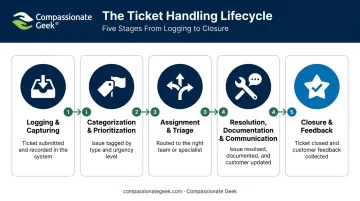
Every ticket, regardless of the tool logging it, passes through the same core stages. Consistency at each stage separates a high-performing help desk from one that's constantly playing catch-up.
How smoothly a ticket moves through this lifecycle depends on your inputs (which channel it came through, how much detail was captured) and your controls, such as SLAs and routing rules.
- Logging and capturing the request: The system creates the ticket from an email, self-service portal, chat message, or phone call, then assigns a unique ID along with requester details, an issue description, and a timestamp.
- Categorization and prioritization: A technician or automation rule tags the ticket by type (hardware, software, network, or access) and ranks it by urgency and business impact, determining its place in the queue.
- Assignment and triage: The ticket routes to whoever has the right expertise, through manual assignment or automated rules based on category and skill set.
- Resolution, documentation, and communication: The technician diagnoses the problem, resolves it, and logs the actions taken while keeping the end user informed along the way.
- Closure and feedback: The technician marks the ticket resolved, documents the root cause, and collects user feedback to fuel continuous improvement.
Ticket Handling Best Practices Every IT Help Desk Should Follow
The lifecycle above is the skeleton. These habits are what turn it into a consistently good experience for technicians and end users alike.
Capture Complete Ticket Details From the Start
A well-formed ticket should include:
- Requester name and contact information
- Clear issue description in the user's own words
- Affected system or device
- Category and priority level
- Timestamp
- Screenshots or error logs, when available
Incomplete tickets are the leading cause of back-and-forth delays. A technician who has to chase down missing details before even starting diagnosis has already lost time that could've gone toward resolution.
Prioritize by Impact and Urgency, Not Arrival Order
First-in-first-out feels fair, but it's the wrong model for IT support. A simple critical/high/medium/low framework based on how many users are affected and how business-critical the system is will serve you better.
Consider the contrast: one employee needs a password reset, while a company-wide network outage has just taken down email for 200 people. If you're working strictly in arrival order, the password reset (submitted five minutes earlier) gets handled first. That's backward.
The UK Government Digital Service publishes a useful reference model for this. Their priority matrix ties response time directly to impact:
| Priority | Example | Response Target |
|---|---|---|
| P1 Critical | Complete outage, unauthorized access | 20 minutes |
| P2 Major | Substantial service degradation | 60 minutes |
| P3 Significant | Intermittent or degraded service | 2 hours (business hours) |
| P4 Minor | Component failure, no immediate impact | 1 business day |
Your own SLA targets may differ, but the underlying logic, matching response speed to actual business impact, holds true across organizations.
Categorize, Route, and Document Every Action
Standardized categories like hardware, software, network, access, and security reduce misrouting and let technicians build specialization in their assigned areas. Consistent categorization also feeds better reporting, helping you spot recurring problem areas before they become chronic.
Once a ticket lands in the right queue, logging every diagnostic step and resolution detail saves the next technician from repeating work already done. Noting that a recurring printer failure traced back to a firmware bug, not a paper jam, stops the next tech from testing the same dead ends. Over time, this searchable ticket history becomes an informal knowledge base, one that's often more useful than a formal wiki because it's grounded in real cases.
Communicate With Compassion, Clarity, and Regular Updates
Technical resolution alone isn't enough. Tone, empathy, and timely updates shape how the end user actually perceives the service they received, regardless of how quickly the fix went in.
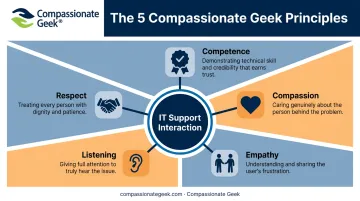
This is where Don Crawley's Compassionate Geek framework, built around five core principles, gives help desks a practical structure:
- Competence: credibility built through consistent, repeatable workflows
- Compassion: recognizing users often contact IT while stressed, confused, or embarrassed
- Empathy: understanding what the user is experiencing beyond the surface-level request
- Listening: treating each interaction as an opportunity for real attention, not just data collection
- Respect: affirming the user's value as a person, not a ticket number
Compare these two update messages on the same delayed ticket:
Poor: "Still working on it. Will update when resolved."
Better: "I found the root cause, a corrupted profile, and I'm rebuilding it now. Should be done within the hour. I know this has kept you from your reports, and I appreciate your patience."
Same information, completely different experience for the user. Compassionate Geek's training and Certified Company program exist to help teams build this skill at scale, moving beyond one-off coaching toward a company-wide standard.
Use Automation and Self-Service Where It Adds Value
Automated routing, AI-suggested responses, and self-service knowledge bases speed up repetitive requests like password resets or software installs. That said, human judgment still matters most for nuanced, sensitive, or high-stakes tickets. Automation should clear the routine work off technicians' plates, not replace the conversation when a user genuinely needs one.
Common Mistakes and Misconceptions in Ticket Handling
Even experienced help desks fall into these traps:
- Rushing to close tickets. Fast resolutions that skip proper diagnosis often generate repeat tickets on the same issue, which hurts your metrics more than a slightly longer first fix would have.
- Treating every ticket as equal priority. Without weighing business impact, a minor cosmetic issue can sit in the same queue position as a system-wide outage.
- Under-documenting resolutions. Skipping notes forces the next technician to troubleshoot from scratch, wasting time that documentation would have saved.
- Assuming automation replaces technicians. Self-service and AI tools complement human support; they don't eliminate the need for trained, empathetic people handling the cases that actually require judgment.
Conclusion
Effective ticket handling blends a consistent operational process with genuine communication skills. Neither one works well without the other. A perfectly categorized, promptly assigned ticket still fails the user if the update they receive is cold or confusing.
The help desks that succeed long-term treat every ticket as both a technical task and a human interaction. That's the philosophy behind Compassionate Geek: IT work is ultimately about solving human problems through technology, not just closing tickets.
With that philosophy in mind, take a look at your current process against the practices covered here. If the gap is more about the human side than the technical side, structured IT customer service training, like the courses Compassionate Geek offers, might be the faster fix.
Frequently Asked Questions
What should be included in a help desk ticket?
A complete ticket needs requester details, a clear issue description, the affected system, category, priority level, and any supporting attachments like screenshots or error logs.
How to prioritize help desk tickets?
Prioritize based on business impact and urgency, meaning how many users are affected and how critical the system is, rather than the order tickets were submitted.
What's the difference between ticket categorization and escalation?
Categorization sorts tickets by type or topic to route them correctly. Escalation moves a ticket to a higher tier or specialist when it can't be resolved at the current level.
How can IT help desks reduce ticket backlog and repeat issues?
Regular backlog reviews, root-cause documentation, self-service resources, and adequate staffing during peak periods all reduce backlog and prevent repeat tickets.
Why does communication style matter in ticket resolution?
Clear, empathetic updates reduce follow-up tickets and build user trust, improving satisfaction scores even when the resolution itself takes longer than expected.
What metrics should IT help desks track to measure ticket handling success?
Track first contact resolution rate, average resolution time, SLA compliance, and user satisfaction. HDI's published guidance suggests first contact resolution rates of 60-70% are typical benchmarks to aim for.