Introduction
It's 10:47 a.m. The shared drive goes down. Forty people can't access the files they need for a noon deadline, and the phone at the help desk starts ringing before the ticket even loads.
That moment centers on a stressed employee who needs someone to make the problem go away, and who needs to feel heard while it happens.
Many IT professionals can diagnose a failed switch in minutes but freeze up when a user starts venting. Technical training rarely covers what to say to a panicked colleague.
That gap has a real price tag. In ITIC's 2024 Hourly Cost of Downtime Survey, more than 90% of midsize and large enterprises reported that one hour of downtime costs over $300,000. Another 41% put that figure between $1 million and $5 million or more.
This article covers eight proven, practical tips for improving IT customer service, built on both technical skill and human connection. Any technician, help desk agent, or IT manager can start using them today.
Key Takeaways
- Great IT support blends technical skill with compassion, empathy, active listening, and respect
- Early, plain-language communication cuts down repeat contacts and frustration
- Prioritizing by business impact builds more trust than sheer speed
- Metrics like First Call Resolution, CSAT, and resolution time reveal where teams need to improve
- Ongoing soft-skills training matters as much as certifications for long-term loyalty
What Is IT Customer Service?
IT customer service is the support given to internal employees or external clients dealing with technical problems. It covers troubleshooting, guidance, and proactive maintenance of hardware, software, and networks.
But fixing the technical issue is only half the job. Good IT customer service means removing obstacles so people can get back to work, reducing frustration, and building trust in the technology function overall. A user who feels dismissed during a printer jam will remember that far longer than the printer jam itself.
How IT Customer Service Differs From Traditional Customer Support
Retail-style customer service usually deals with a purchase decision or a return. IT support deals with people mid-crisis: a missed deadline, a corrupted file, an outage that's costing the company money right now.
That raises the emotional stakes. On top of that, IT professionals have to translate dense technical jargon into language a stressed, non-technical person can actually use. Getting that translation right is often the difference between a calm resolution and an angry escalation.
Why Great IT Customer Service Matters
Poor IT support doesn't just annoy people. It costs money, drains morale, and for managed service providers, it drives clients straight to a competitor.
According to Forrester's 2021 Employee Experience Index research, technology-related issues account for 30% of the factors that most influence employee engagement.
When support feels slow or dismissive, that frustration bleeds into how people feel about their whole job, not just their broken laptop.
Great IT customer service flips that dynamic. It turns technicians into trusted partners instead of "the people you call when something breaks." That shift shows up in:
- Higher contract renewals for MSPs and outsourced IT providers
- More client referrals and positive word of mouth
- Stronger internal reputation for the IT department
- Lower staff turnover, since happier users make for less adversarial support tickets
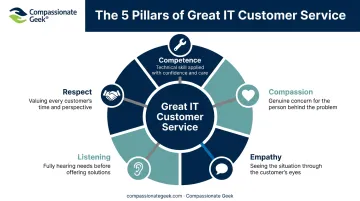
The most effective IT professionals build their approach around five core pillars: Competence, Compassion, Empathy, Listening, and Respect. Don R. Crawley, founder of Compassionate Geek, built his entire training philosophy around this framework, and it threads through every tip below.
8 Proven Tips to Improve IT Customer Service
Tip 1: Master Active Listening Before You Troubleshoot
Active listening means giving full attention, paraphrasing the issue back to the user, and asking clarifying questions before touching a keyboard.
Picture two technicians handling the same complaint: "My email isn't working."
- Agent A assumes it's a login issue, resets the password, and hangs up, only to get a callback ten minutes later because the real problem was a full mailbox.
- Agent B asks, "Can you tell me exactly what happens when you try to send or receive?" and discovers the mailbox is at capacity within thirty seconds.
Agent B saved a wasted troubleshooting cycle and the user's afternoon.
Tip 2: Communicate Early, Even Before You Have a Fix
Silence is one of the biggest drivers of frustration and escalations. A user who hears nothing for twenty minutes assumes they've been forgotten, even if you're actively working the ticket.
Send a quick acknowledgment within minutes: "Got your ticket, I'm looking into it now, and I'll update you by 2 p.m." That single message does more to reduce anxiety than most technicians realize, and it costs almost nothing to send.
Tip 3: Set Realistic Expectations and Follow Through
Vague phrases like "we're working on it" invite repeated check-ins. Replace them with specifics: "I expect this resolved within two hours. I'll update you at the one-hour mark either way."
Then actually send that update, even if it's just "still working on it, no change yet." Consistently following through on small promises builds more long-term trust than heroic last-minute saves ever will.
Tip 4: Prioritize by Business Impact, Not Just Order Received
First-come, first-served feels fair, but it isn't always smart. A password reset for one person shouldn't jump ahead of a network outage affecting an entire floor.
Assess urgency by asking:
- How many people are affected?
- How much revenue or productivity is at stake?
- Is there a deadline or client-facing impact involved?
Clear quick, easy tickets after urgent ones to keep the queue manageable and preserve mental bandwidth for the complex problems.
Tip 5: Translate Technical Jargon Into Plain Language
"DNS latency" means nothing to most users. "The site is loading slowly because of a network delay" means everything.
| Jargon-heavy | Plain language |
|---|---|
| "We're seeing packet loss on the WAN link" | "Your internet connection is dropping data, which is why pages are slow" |
| "The mail server queue is backed up" | "Emails are delayed right now, but they will arrive shortly" |
Plain language shows respect for the user's time and intelligence, reducing confusion and cutting down on follow-up calls asking what you meant.
Tip 6: Show Compassion and Acknowledge Frustration
Before diving into a fix, try: "I understand how disruptive this is for you." That single sentence lowers tension and signals you're on the user's side, not just there to close a ticket.
Show compassion without excusing bad behavior. Remember your own frustration the last time technology let you down, and treat the person in front of you the same way.
Tip 7: De-escalate Difficult Interactions With Calm and Respect
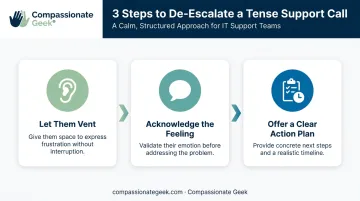
Some interactions still boil over despite your best efforts. A simple three-step approach handles most of them:
- Let them vent without interrupting, even when you already know the fix
- Acknowledge the feeling, using language like, "I understand why that's frustrating, let's work through this together"
- Offer a clear action plan with a specific timeline attached
Know your limits, too. If a situation escalates past what you can resolve alone, loop in a manager or colleague sooner rather than later.
Tip 8: Invest in Ongoing Soft-Skills Training for Your IT Team
Technical certifications teach people how to fix systems. They don't teach emotional intelligence, active listening, or conflict resolution, and those gaps show up in every escalated ticket.
This is exactly the gap Compassionate Geek was built to close. Its IT Customer Service Training course and Compassionate Geek Certified Company program give teams a structured way to build these skills.
Drayton Mayers, President of TeamLogic IT East Memphis, has credited this kind of training with winning new business by differentiating his team through compassionate service alongside technical skill.
How to Measure Success in IT Customer Service
You can't improve what you don't track. Four metrics matter most:
- First Contact Resolution (FCR): Percentage of issues resolved on the first contact. HDI sets a general target of 60% to 70% for first contact resolution, though targets vary by industry.
- Customer Satisfaction (CSAT): Measures how satisfied users are with a specific interaction, usually via a short post-ticket survey.
- Net Promoter Score (NPS): Gauges overall loyalty on a 0-10 scale, where promoters minus detractors equals your score.
- Average Resolution Time: Tracks how long it takes to close a ticket from open to resolved.
Numbers alone don't tell the full story. Pair them with qualitative feedback, such as open-ended survey comments, to capture how support actually felt to the person receiving it.
Teams that consistently apply the five pillars (competence, compassion, empathy, listening, and respect) tend to see these metrics climb together over time. Satisfaction is shaped as much by how support feels as by how fast it arrives.
Frequently Asked Questions
What is IT customer service?
IT customer service supports employees facing technical issues with hardware, software, or networks. The real goal is enabling people to do their jobs, not just fixing systems.
What are IT support services?
Common IT support services include help desk troubleshooting, network and security management, software maintenance, and IT consulting. Most organizations combine several of these under one support function.
What is 24/7 IT support?
24/7 IT support means round-the-clock availability for critical issues. It's common among businesses with global teams or systems that can't tolerate any downtime.
What is an IT support agent?
An IT support agent is the frontline technician who diagnoses and resolves technical issues. Their job includes clear communication with the end user, not just fixing the underlying problem.
How do you handle an angry or frustrated IT customer?
Let them vent without interrupting, acknowledge their frustration directly, then offer a clear action plan with a specific timeline. This sequence, covered in Tip 7, defuses most tense situations quickly.
What skills are most important for good IT customer service?
Active listening, empathy, technical competence, and respect form the core skills of good IT customer service. These align with our five-pillar framework: Competence, Compassion, Empathy, Listening, and Respect.