
Too many technicians skip straight to diagnostics. They fire off "What's your OS version?" before acknowledging that the person on the other end is stressed, behind on a deadline, or just plain frustrated. That approach stretches call times and creates repeat tickets.
This guide organizes IT help desk questions into four buckets: diagnostic, empathy-driven, scenario-specific, and closing. The framework comes from Don R. Crawley's Compassionate Geek philosophy — Competence, Compassion, Empathy, Listening, and Respect — built on the idea that IT jobs aren't really about technology. They're about crafting technical solutions to human problems.
Key Takeaways
- Open-ended, empathy-aware questions reduce back-and-forth and repeat contacts
- Technical questions and emotional check-ins carry equal weight in every support call
- Login, network, hardware, and software issues each need targeted follow-up questions
- Closing questions confirm the fix worked, not just that the ticket closed
Why the Right Questions Matter in IT Support
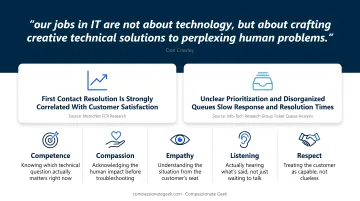
IT support looks technical on the surface, but it's a human problem wearing a technology costume. Don Crawley puts it directly: "our jobs in IT are not about technology, but about crafting creative technical solutions to perplexing human problems."
A frustrated employee locked out of their email doesn't care about Active Directory sync delays; they care about missing a client deadline.
Questions are the bridge between what a customer feels and what a technician needs to know. Skip that bridge, and you're guessing.
There's real data behind the mechanics of speed here, even if it doesn't isolate "good questions" as a standalone variable. MetricNet's first contact resolution research shows FCR is strongly correlated with customer satisfaction. Resolve it the first time, and satisfaction climbs with it.
Getting to that first-contact resolution starts with intake. Info-Tech Research Group's ticket queue analysis found that unclear prioritization and disorganized queues slow down response and resolution times. Structured intake, meaning the right questions asked in the right order, feeds that structure.
This is where the Five Principles come in as a practical lens:
- Competence: knowing which technical question actually matters right now
- Compassion: acknowledging the human impact before troubleshooting
- Empathy: understanding the situation from the customer's seat
- Listening: actually hearing what's said, not just waiting to talk
- Respect: treating the customer as capable, not clueless
Compassionate Geek's training programs and Certified Company program exist specifically to build these five skills into daily habits, not just onboarding checklists.
Essential Diagnostic Questions to Ask Every Customer
Diagnostic questions gather the facts you need to fix the problem. Ask them in the wrong order, or without context, and you sound like a form instead of a person.
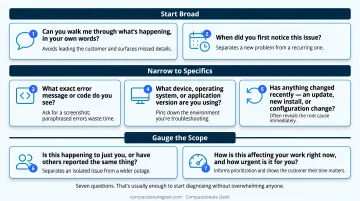
Start broad. Two questions do most of the heavy lifting:
- "Can you walk me through what's happening, in your own words?" This avoids leading the customer toward an answer and often surfaces details a scripted question would miss entirely.
- "When did you first notice this issue?" A timeline separates a brand-new problem from a recurring one. Recurring problems point to root causes, not quick fixes.
Once you have the story, narrow in on specifics:
- "What exact error message or code do you see?" Ask for a screenshot or the exact wording. Paraphrased errors ("something about a network thing") waste time.
- "What device, operating system, or application version are you using?" This pins down the environment you're actually troubleshooting.
- "Has anything changed recently — an update, new install, or configuration change?" This single question often reveals the root cause immediately.
Before diving into fixes, gauge the size of the problem:
- "Is this happening to just you, or have others reported the same thing?" This separates an isolated issue from a wider outage.
- "How is this affecting your work right now, and how urgent is it for you?" This informs prioritization and shows the customer that their time matters.
Seven questions. That's usually enough to start diagnosing without overwhelming anyone.
Empathy-Driven Questions That Build Trust and Calm Frustrated Customers
Technical accuracy doesn't matter much if the customer feels dismissed. HDI's research on power skills notes that active listening and empathy directly build trust and collaboration in IT support settings. That trust is what turns a tense call into a cooperative one. HDI's 2025 analysis on IT power skills frames these as career-defining capabilities essential to long-term success.
Try these in practice:
- "I can hear this is frustrating. How long has this been slowing you down?" Acknowledge the emotion before the fix. This is the Compassion principle in action.
- "How is this impacting your day or your team's deadlines?" Shows genuine interest in consequences beyond the ticket number.
- "Is it okay if I walk you through a few steps together?" Asking permission hands back a sense of control to someone who's likely lost patience.
Reflective questions matter too. Confirming what you heard shows you're actually listening instead of merely nodding along.
"So if I understand correctly, it started right after the update — is that right?" This single habit reduces miscommunication more than almost anything else on this list.
None of this requires a script; it just requires slowing down for ten seconds before jumping to step one.
Questions Tailored to Common Support Scenarios
Different problems need different follow-up questions. A generic checklist wastes time here; specificity gets you to the fix faster.
Login and Account Access Issues
- Have you changed your password or requested a reset recently?
- Is caps lock on? (still the most common overlooked culprit)
- Is the account locked, and is it shared across multiple devices?
Network and Connectivity Issues
- Wi-Fi or wired connection?
- Affecting one device or several on the same network?
- Did it start after a router restart, ISP outage, or office move?
Hardware Problems
- Any recent physical changes — drops, spills, new peripherals plugged in?
- Were there error lights, unusual sounds, or a blue screen when it happened?
Software and Application Issues
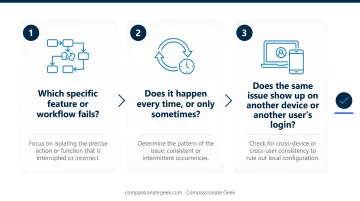
- Which specific feature or workflow fails?
- Does it happen every time, or only sometimes?
- Does the same issue show up on another device or another user's login?
These lists serve as quick reference points that get you to the right diagnostic path two or three questions faster than starting from zero.
Closing the Conversation: Confirmation Questions and Mistakes to Avoid
A ticket isn't resolved until the customer says it's resolved, not when the technician assumes it is.
Confirming Resolution and Satisfaction
Two questions close the loop properly:
- "Can you try that action again now and confirm it's working on your end?" Verify the fix from the customer's perspective, not just your own screen.
- "Is there anything else I can help you with before we close this ticket?" This single question prevents a wave of repeat contacts for related issues that never got mentioned.
Common Mistakes to Avoid When Questioning Customers
A few habits quietly undermine good support:
- Stacking multiple technical questions at once: this overwhelms non-technical users and forces them to guess which one to answer first
- Using jargon without checking for understanding: "have you cleared your DNS cache" means nothing to most people
- Sounding like an interrogation: rapid-fire questions with no acknowledgment feel transactional, not collaborative
Pairing a diagnostic question with a brief empathy statement (something as simple as "I know this is annoying, but can you tell me...") keeps the conversation feeling like teamwork rather than an interrogation.
This pairing rarely comes naturally under pressure, which is why Compassionate Geek's courses train IT teams on it directly. Organizations pursuing Compassionate Geek Certified Company status build it into ongoing training rather than treating it as a one-time workshop.
Frequently Asked Questions
What are some good customer service questions to ask?
Good questions combine open-ended discovery ("What's going on?") with an empathy check-in like "How is this affecting you?" Follow up with a confirmation question such as "Did that resolve it?" to diagnose the problem and reassure the customer at the same time.
What should I ask first when a customer reports an IT issue?
Start with an open-ended question about the problem in the customer's own words before moving to technical specifics. This surfaces context a scripted question would miss and prevents the customer from feeling rushed.
How do I ask questions without sounding like an interrogation?
Pair each technical question with a brief empathy statement or a short explanation of why you're asking. For example: "I know this is frustrating — can you tell me what error you're seeing?"
What questions help de-escalate an angry customer?
Acknowledgment questions like "How has this affected you today?" work well to validate the customer's frustration. Follow up with a permission-based question, such as "Is it okay if I walk you through a few steps?", before any troubleshooting begins.
How many questions should I ask before starting troubleshooting?
There's no fixed number, but 3-5 focused questions covering the issue, timeline, environment, and impact are usually enough to begin diagnosing effectively.
What's the difference between help desk questions and service desk questions?
Help desk questions focus on quick, tactical fixes for an immediate technical issue. Service desk questions often go broader, covering request fulfillment, business context, and longer-term IT service needs.