Introduction
A confusing chat reply doesn't just slow down a support ticket. It makes the customer doubt whether the person on the other end actually knows what they're doing.
That's the real risk with live chat in IT support. Unlike a retail chat about a return policy, a technical chat is often tied to a broken laptop, a missed deadline, or lost files. One curt or jargon-heavy response, and trust in the agent's competence takes a hit.
Many IT professionals are technically sharp but never trained on the soft-skill side of communication. They can fix the server. They just haven't learned how to sound reassuring while doing it.
This guide breaks down live chat etiquette specifically for IT and technical support, not generic retail customer service. The goal: help your team sound as competent as they actually are.
Key Takeaways
- Fast, warm greetings set the tone before troubleshooting even begins
- Active listening and plain language matter more in IT chat than retail chat
- Positive framing and empathy reduce frustration, even without an instant fix
- Chats should stay open until the customer confirms the issue is resolved
- Consistent etiquette requires team-wide training, not individual good intentions
What Is Live Chat Etiquette in IT Customer Service?
Live chat etiquette is the set of communication guidelines that keep a chat interaction professional, clear, and positive from greeting to sign-off. It shapes whether a customer walks away trusting your team or dreading the next ticket.
In IT support specifically, chat carries real weight. A 2026 benchmark from HappySignals and ISG, which analyzed 803,000 IT-request responses collected in 2025, found live chat scored +79 Happiness. That put it ahead of self-service portals at +77, though still behind phone support at +83 and walk-in help at +94.
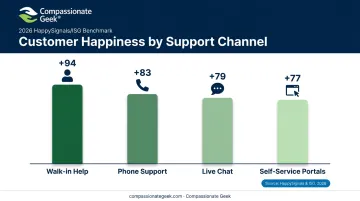
That's a channel people rate well when it's done right, but one where the margin for error is smaller than you'd think.
Why does IT chat require a different playbook than retail chat?
- Translating technical jargon into language a stressed, non-technical user can follow
- Working with no visual cues, no screen to point at, unless screen sharing is involved
- Calming customers who are anxious about downtime, data loss, or missed deadlines
- Diagnosing symptoms, since the "problem" a customer describes is rarely the actual cause
That last point is the crux of it. A retail chat agent rarely needs to diagnose anything. An IT chat agent almost always does.
Core Best Practices for Live Chat Etiquette
Respond Quickly and Acknowledge Every Message
Speed matters, but it's not just about hitting a number. According to Zendesk's first reply time guide, a first reply of one minute or less counts as "good" and 40 seconds or less as "better" for live chat.
For IT teams during high-volume periods, that speed is hard to guarantee on every single message. So build in a safety net:
- Use canned acknowledgments ("Got it, looking into this now") while you investigate
- Deploy a chatbot to confirm receipt and collect basic details before a human joins
- Send automated ticket-queue notifications so no request sits silently unacknowledged
Silence reads as neglect. A quick "I'm on it" buys you time without losing trust.
Open with a Personalized, Professional Greeting
The first line sets the tone for everything that follows. Compare these two openers:
- Too formal: "Greetings. Please state the nature of your technical inquiry."
- Too casual: "hey what's up, what's broken lol"
- Right balance: "Hi Sarah, this is Jordan from IT support. I see you're having trouble with email sync, let's get that sorted."
Using the customer's name and introducing yourself by name humanizes the exchange immediately. It's a small move that signals a real person is paying attention, not a script running on autopilot.
Practice Active Listening Before Jumping to a Fix
Non-technical users describe symptoms, not root causes. "My computer is slow" could mean a dozen different things. Jumping straight to a fix based on an assumption wastes everyone's time.
Instead:
- Read the entire message before typing a reply, even if you think you've spotted the issue halfway through
- Paraphrase what you heard, such as "So the printer works from your laptop but not your desktop, is that right?"
- Ask one clarifying question rather than a barrage of them
- Wait for the customer to finish their explanation before offering next steps
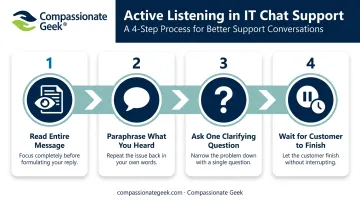
Interrupting mid-explanation, even in text form by replying before they've sent their full thought, signals impatience. Letting someone fully describe their complaint before you interject isn't just polite. It usually surfaces details you'd have missed otherwise.
Match Tone and Use Positive, Plain Language
Jargon is the fastest way to make a customer feel stupid, even when that's the last thing you intend. Here's the difference:
| Jargon-heavy | Plain language |
|---|---|
| "Your DNS cache is corrupted, causing resolution failures." | "Your computer's saved a bad shortcut for reaching websites. I'll clear that out and it should load normally." |
| "We're seeing packet loss on your subnet." | "There's a connection issue on your part of the network. I'm working with the team to fix it." |
Positive framing matters just as much as plain language. Swap "we can't do that" for "here's what we can do instead." Swap "that's not possible right now" for "I'm working on a way to get you back up as soon as possible." Same facts, completely different feeling on the receiving end.
Handling Technical Jargon and Difficult Support Conversations
IT chats get hard fast because customers report symptoms while agents need root causes. That gap requires patient, diagnostic questioning, not a lecture on what actually went wrong.
When apologizing for outages or vendor-side issues:
- Keep it sincere and specific: "I'm sorry this outage is affecting your work today."
- Don't over-promise a fix timeline you don't control
- Offer a concrete next step instead: "I'll update you within the hour, even if there's no change yet."
When a customer vents about something unrelated, the instinct is to redirect immediately. Don't. Let them finish.
Wait for the complete description of the complaint before steering back on topic. Acknowledging frustration first ("I understand why that's frustrating") actually gets you to resolution faster than cutting them off would.
Empathy statements that work well for tech-specific stress:
- "I understand why that's frustrating, let's work through this together." (for lost work or a crash before a big meeting)
- "I just wanted to let you know we're still on this. I'll check back in an hour." (for extended downtime)
- "Hi, I'm Jordan from IT support, I'm going to help you sort this out today." (for first contact, builds trust immediately)
Escalating without making the customer repeat themselves:
- Summarize the issue and everything already tried in the internal notes before transferring
- Tell the customer who's picking up and why
- Confirm the specialist has full context before stepping away from the chat
A customer forced to re-explain their problem after being transferred feels like their time didn't matter the first time. That's an easy trust-killer to avoid.
Closing Strong: Confirm Resolution and Collect Feedback
Never close a chat because you think the issue is fixed. Close it because the customer says so. Assuming resolution and ending the conversation early is one of the fastest ways to generate a repeat ticket, and a frustrated one at that.
Closing phrases that leave a good last impression:
- "Is there anything else I can help you with today?"
- "Thank you again for your patience while we sorted this out."
- "Feel free to reach back out if anything else comes up."
Once resolution is confirmed, send a short post-chat survey. Measuring customer satisfaction is standard practice across the technical support industry. In fact, an HDI survey of 264 technical support organizations found that 95% of them actively assess customer satisfaction after interactions.
That kind of consistent measurement is what lets a team spot patterns, whether that's a recurring complaint about response speed or a specific agent whose chats consistently score lower than the rest.
Building a Culture of Chat Etiquette: The Five Principles Approach
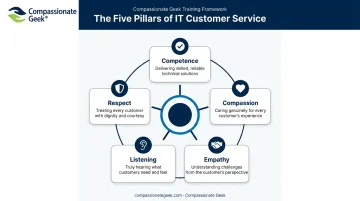
Individual good intentions don't scale across a support team. What scales is a shared framework everyone's trained on. Compassionate Geek's five core principles of IT customer service map directly onto the chat behaviors covered above:
- Competence — clear, accurate documentation and getting the fix right the first time
- Compassion — remembering there's a stressed human behind every message, not just a ticket number
- Empathy — meeting the customer at their technical level, without condescension
- Listening — reading the full message, paraphrasing, and asking before assuming
- Respect — no sarcasm, no dismissive language, even when the customer is difficult
Here's the catch: even skilled technicians default to blunt, jargon-heavy habits under pressure. Without structured reinforcement, that drift is normal, not a character flaw. Consistency needs training, feedback loops, and, ideally, a shared standard the whole team is measured against.
That's the gap Compassionate Geek's courses and Certified Company program are built to close. They give IT managers and MSPs a way to formalize these five principles across an entire support team, rather than hoping each agent figures it out alone.
Frequently Asked Questions
What are some best practices for customer service chat?
Respond fast, actively listen before troubleshooting, use positive and plain language instead of jargon, and never close the chat until the customer confirms the issue is resolved.
What are the five golden rules of customer service?
Commonly cited principles include listening well, being respectful, responding quickly, being honest, and following through on commitments. These closely mirror Compassionate Geek's Competence, Compassion, Empathy, Listening, and Respect framework.
How is live chat etiquette different for IT support versus retail chat?
IT chat requires translating technical jargon into plain language, diagnosing vague symptoms rather than clear complaints, and managing higher customer anxiety tied to downtime or data loss.
How fast should an IT support agent respond in a live chat?
Industry guidance suggests a first reply within one minute is good, with under 40 seconds considered even better. During high-volume periods, an automated acknowledgment can bridge the gap until an agent responds directly.
How do you handle a frustrated, non-technical customer in live chat?
Acknowledge their frustration directly, avoid technical jargon, and focus on clear next steps rather than over-explaining or arguing about what went wrong.
How can IT teams train agents to maintain consistent chat etiquette?
Structured training programs, like those from Compassionate Geek, help standardize tone, empathy, and technical communication across an entire support team, rather than leaving it to individual habits.