Introduction
IT help desks live in a constant state of pressure. Tickets pile up, users get impatient, and expectations keep climbing every year. Technical skill matters, but it's not enough on its own to keep users satisfied.
Here's the gap most "best practices" guides miss: they focus almost entirely on tools, automation, and service-level agreements while ignoring the human side of support. Yet most user dissatisfaction traces back to how a technician communicates, not whether the fix actually worked.
This guide covers both halves of the equation. You'll get the process fundamentals every help desk needs, plus the human-centered practices—rooted in empathy and active listening—that separate a good help desk from one users actually trust.
Key Takeaways
- Centralized knowledge bases and standardized processes cut resolution time and reduce inconsistency between agents
- Poor communication and technician attitude drive many negative support experiences, regardless of resolution
- Automation and self-service free agents to focus on complex, high-value tickets
- Ongoing training in both technical and interpersonal skills sustains performance over the long haul
Foundational Best Practices: Process, Tools & Knowledge Management
Solid processes are the backbone of any help desk that wants to scale without burning out its team. Get these five elements right, and everything else, including the human side, gets easier.
Build a Searchable Knowledge Base
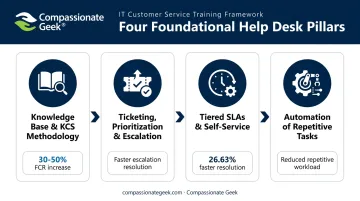
A centralized knowledge base stops agents from solving the same problem from scratch every time. The Knowledge-Centered Support (KCS) approach takes this further: agents create or refine articles while resolving tickets, turning documentation into a byproduct of daily work rather than a separate chore.
Organizations implementing KCS report 30% to 50% increases in first-contact resolution and 50% to 60% faster time to resolution, according to the Consortium for Service Innovation's KCS v6 Practices Guide.
Ticketing, Prioritization, and Escalation
A ticketing system only works if it routes issues correctly the first time. Build in:
- Clear categorization so tickets land with the right specialist immediately
- Priority tiers based on business impact, not just who complains loudest
- Escalation paths that trigger automatically when resolution windows are missed
Tiered SLAs and Self-Service
Not every ticket deserves the same response time. A critical outage needs a different SLA than a routine software request.
Pair this with a self-service portal for password resets, status checks, and FAQs. HappySignals data shows self-service already handles 39% of IT-incident contacts and 60% of IT-request contacts without ever reaching a live agent.
Automate the Repetitive Work
Automating repetitive Tier 1 tasks, such as password resets, provisioning, and basic routing, pays off quickly. Freshworks found that workflow automation cut average resolution time by 26.63%, while generative-AI self-service tools produced 53% ticket deflection across a dataset of over 167 million tickets (Freshworks 2024 Benchmark Report).
The Human Side: 5 Core Principles of Compassionate IT Support
IT work centers on solving human problems through technology, more than repairing machines. That distinction matters more than most technicians realize.
Don R. Crawley, founder of Compassionate Geek, built an entire training philosophy around this idea after noticing that IT professionals often have strong technical chops but weak interpersonal instincts. His framework identifies five core principles of IT customer service success:
- Competence – knowing your systems well enough to act without arrogance
- Compassion – recognizing distress and choosing to respond in a way that reduces it
- Empathy – understanding how the situation feels from the user's side, even if you'd handle it differently
- Listening – letting people finish their sentence before jumping to a fix
- Respect – treating every user as capable, regardless of their technical literacy
Compassion, Empathy, and Respect in Practice
A user's laptop crashes an hour before a big presentation. Fixing the laptop is the easy part. Acknowledging the lost time and stress they're under, before diving into troubleshooting, makes the interaction feel personal.
What looks like a "simple" password reset to a technician might feel like a major disruption to someone who's already stressed. Saying something as small as "I understand why that's frustrating" validates the user before you move to a solution.
Respect shows up in word choice. Translating technical explanations into plain language shows respect for the user's time and intelligence. Even sharp, capable people get flummoxed by computers sometimes.
These aren't abstract ideas. TeamLogic IT East Memphis requires every employee to complete Compassionate Geek's training, and its president credits that mandatory investment with winning new clients away from competitors who "don't have the right mix of compassionate geeks and technology."
Communication & De-escalation: Turning Frustrated Users Into Loyal Ones
Technical accuracy alone doesn't produce satisfied users. HappySignals data found that 51% of respondents reporting a negative incident experience said the issue simply wasn't solved, but attitude and communication also loom large: 20% cited technician attitude and 25% cited poor communication or training as factors in a negative experience (HappySignals Global IT Experience Benchmark, 2023).
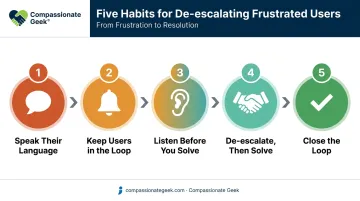
Five habits separate technicians who defuse frustration from those who fuel it:
- Speak their language. Translate jargon into terms that match the user's comfort level; a developer and an accounts-payable clerk need very different explanations for the same network issue.
- Keep users in the loop. Proactive status updates eliminate the dreaded "any update on my ticket?" follow-up. A quick message at each stage (received, assigned, in progress, resolved) does more to reduce anxiety than most technicians assume.
- Listen before you solve. Let users finish explaining the problem before proposing a fix. Paraphrasing what you heard back to them ("So the issue started after yesterday's update?") improves diagnostic accuracy and shows you're paying attention.
- De-escalate, then solve. When a user is upset, name the frustration ("I can see why this is frustrating"), confirm you're on it, and move to problem-solving only after they feel heard.
- Close the loop. Follow up after resolution to confirm the fix held and capture feedback. This habit surfaces recurring pain points before they become recurring complaints.
One MSP technician saw complaints about his support turn into praise within two weeks of applying these habits after training.
Measuring Success: KPIs, CSAT & Beyond
Speed metrics tell only half the story. A help desk optimizing purely for resolution time can quietly tank user satisfaction if agents rush interactions.
Core Operational Benchmarks
Based on Freshworks' 2024 benchmark report covering over 167 million tickets:
| KPI | Global Benchmark | Cross-Industry Range |
|---|---|---|
| First-Contact Resolution | 73.9% | 71.0%–76.1% |
| Average Resolution Time | 24.15 hours | 19.64–30.70 hours |
| First-Response SLA Attainment | 95.5% | 94.5%–97.2% |
| Resolution SLA Attainment | 95.7% | 94.8%–97.2% |
Don't Ignore the Human Metrics
HDI (Help Desk Institute) classifies CSAT and NPS as subjective KPIs and FCR/MTTR as objective ones, arguing that operational measures alone can't capture the empathy delivered in an interaction. A ticket can hit every SLA target and still leave a user annoyed if the technician was curt.
Build a Combined Scorecard
Pair technical metrics with experience metrics so teams don't chase speed at the expense of satisfaction:
- First-contact resolution + CSAT per interaction
- Average resolution time + sentiment trend over the quarter
- SLA compliance + repeat-contact rate for the same issue
Training & Continuous Improvement for Long-Term Success
Help desk excellence isn't a one-time achievement. Technology shifts, ticket volumes grow, and user expectations keep rising, which means training can't stop after onboarding. Building that ongoing commitment starts with a formal framework, not ad-hoc coaching sessions.
A Formal Framework for Culture
Programs like the Compassionate Geek Certified Company program, with Green and Silver certification levels, give organizations a structured path to build a customer-focused culture rather than leaving soft skills to chance. Jenna Koontz, Senior Director of Global Support Escalations at FinancialForce.com, reported that her team's CSAT scores soared once agents grasped core relationship principles from this kind of training.
Blend Technical and Soft-Skills Training
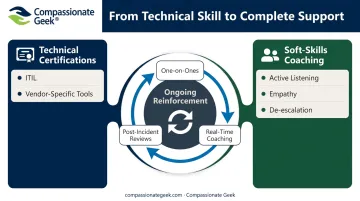
Beyond formal certification, day-to-day skill-building matters just as much. Well-rounded agents need both:
- Technical certifications (ITIL, vendor-specific tools) to stay current on systems
- Structured soft-skills coaching covering active listening, empathy, and de-escalation
- Ongoing reinforcement through one-on-ones, post-incident reviews, and real-time coaching rather than a single annual session
Julie Quigley, Director of Administration/IT at Pittsburgh Water and Sewer Authority, noted a marked improvement in IT staff responsiveness and communication after her team went through this kind of combined training. That's the real payoff: technicians who are just as comfortable explaining a fix as they are performing one.
Frequently Asked Questions
Is AI replacing IT's help desk?
AI is automating routine Tier 1 tasks like password resets, ticket routing, and FAQs, but human judgment, empathy, and complex troubleshooting still require a person. AI complements the help desk more than it replaces it.
What are common help desk issues?
The most frequent tickets involve password and login problems, slow internet or connectivity, software installation errors, and access or permission requests. Identity and access issues alone make up a large share of total ticket volume.
What makes a good help desk?
A good help desk combines fast, competent technical resolution with clear communication, empathy, and consistent documentation. Speed and kindness matter equally; the best help desks deliver both at once.
How can IT help desks improve customer satisfaction?
Faster response times, proactive status updates, and training agents in active listening and empathy are the biggest satisfaction drivers. Small communication habits often matter more than shaving minutes off resolution time.
What skills should IT help desk technicians have?
Technicians need solid troubleshooting ability alongside communication, patience, active listening, and emotional intelligence. The best agents treat these as equally important, not as a technical skill with soft skills bolted on.
How often should help desk teams receive training?
Training should be ongoing, not a one-time onboarding event. Quarterly technical refreshers paired with regular soft-skills coaching keep both competence and communication sharp as tools and expectations evolve.