Introduction
An employee's laptop won't connect to the network. Within minutes, an IT help desk technician has logged the ticket, run through a diagnostic sequence, and gotten the connection back online. To the employee, it looked simple. It wasn't.
Many people assume help desk work means resetting passwords all day. That misconception undersells a role that blends technical troubleshooting with real communication skill under pressure.
This guide breaks down what a help desk actually does and the core tasks that fill a technician's day. It also covers how responsibilities shift across support tiers, plus the technical and human skills that separate a good technician from a great one.
Key Takeaways
- Help desk work splits into unplanned incidents and planned service requests
- Ticket quality at intake determines how fast an issue gets resolved
- Escalation doesn't mean handing off responsibility: the original technician retains ownership
- Active listening and empathy matter as much as technical know-how
- AI now handles routine tasks, leaving complex issues to human agents
What Does an IT Help Desk Actually Do?
A help desk is the centralized first point of contact for anyone with a technical problem, question, or request. According to TechTarget's definition of a help desk, it's typically the front door into a broader IT Service Management (ITSM) function. That means it sits inside a larger structure that includes ticketing, escalation paths, and reporting.
Help desks handle two distinct categories of work:
- Incidents — unplanned disruptions, such as a network outage or a crashed application
- Service requests — planned, routine tasks, like provisioning a new laptop or granting software access
ITIL frameworks define an incident as an unplanned interruption to a service, while a service request covers standard, pre-approved asks like access or information. Most help desks juggle both simultaneously.
That's exactly why the role demands versatility. One ticket might be a genuine emergency; the next might be a routine fulfillment task that just needs to move through the queue efficiently.
Core IT Help Desk Tasks and Responsibilities
Help desk work isn't one flat list of duties. It breaks into distinct functional categories, and understanding each one clarifies what the job actually involves day to day.
Ticket Intake, Logging, and Prioritization
A complete ticket record needs specific information before a technician can diagnose anything useful. According to HDI's guidance on incident management, a solid intake captures:
- Who reported the issue and their contact details
- When the problem occurred
- A clear description of what happened
- The affected device or configuration item
- Which services are impacted
- Any troubleshooting already attempted
Missing details at intake are the leading cause of slow resolution. A technician who has to circle back and ask "which app were you using?" has already lost time that a better intake form would have saved.
Once logged, tickets get prioritized by two factors: business impact and urgency. A single user with a slow printer waits. A finance team locked out of the payment system during month-end close does not.
Diagnosis and Technical Troubleshooting
This is where the actual fixing happens. Technicians lean on knowledge base scripts, structured diagnostic sequences, and remote support tools to resolve high-frequency issues such as:
- Password resets and account lockouts
- Connectivity and Wi-Fi problems
- Software crashes and error messages
- Printer and peripheral failures
The goal at first contact is resolution or, at minimum, a workaround that gets the user back to work. First Contact Resolution (FCR) is the industry term for the percentage of issues closed during that first interaction, as defined by MetricNet's overview of resolution metrics. Higher FCR generally signals a more efficient, better-trained front line.
Escalation and Ticket Ownership
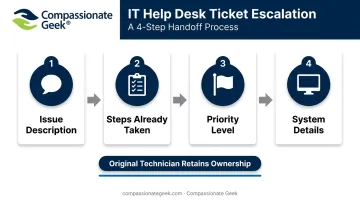
Not every issue resolves at first contact. When a technician escalates, a clean handoff includes:
- Issue description: what's broken, explained in plain terms
- Steps already taken: so the next technician doesn't repeat failed fixes
- Priority level: based on business impact
- System details: device, software version, and configuration
Incomplete handoffs are one of the most common operational headaches in support environments. A technician receiving a vague ticket has to redo intake work that should've already happened.
Here's the part often overlooked: escalating doesn't mean walking away. Under HDI's Total Contact Ownership model, the original technician stays the designated owner of the ticket through resolution, providing status updates even after specialists take over the technical work. That ownership keeps users informed and prevents tickets from stalling once specialists take over the technical work.
Documentation and Knowledge Base Maintenance
Every resolved ticket that doesn't get documented is a missed opportunity. HDI research found that among organizations offering self-help resources, the median estimated ticket deflection rate sits at 12%, with about a third of organizations reporting deflection above 20%. That's real ticket volume avoided simply because someone wrote down the fix.
There's also an ongoing maintenance responsibility. Software updates, policy changes, and new tools make old articles stale fast. A knowledge base article describing a login process that changed six months ago doesn't just fail to help; it actively causes callbacks when users follow outdated steps.
User Communication, Follow-Up, and Training
Proactive status updates on open tickets matter more than technicians sometimes realize. A user who hears nothing for two days assumes they've been forgotten, even if the ticket is actively being worked. Post-resolution check-ins confirm the fix actually held and close the loop properly.
Ad hoc training is also a legitimate help desk task, separate from break-fix work. Walking a user through a new expense-reporting tool or explaining two-factor authentication is core help desk work, not a distraction from it.
Interpersonal skill shapes how users perceive the entire IT department here, often more than the technical fix itself.
Help Desk Support Tiers: How Responsibilities Shift
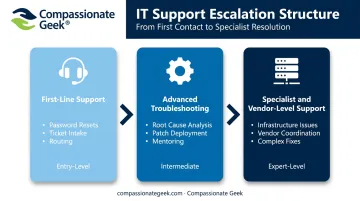
Support tiers organize technicians by complexity level, and responsibilities shift meaningfully at each stage. As HDI explains in its breakdown of tiered support, each level demands distinct skills, authority, and scope of work.
Tier 1: First-Line Support
Tier 1 technicians handle the volume: password resets, basic software fixes, ticket intake, and routing. This is where most help desk careers start. CompTIA describes Tier 1 as typically an entry-level position, often requiring under two years of experience.
Common Tier 1 responsibilities:
- Logging and categorizing incoming tickets
- Resolving common, well-documented issues
- Escalating anything outside their scope
Tier 2: Advanced Troubleshooting
Tier 2 technicians pick up what Tier 1 can't solve. Their work includes:
- Configuring system changes across environments
- Analyzing root causes behind recurring problems
- Deploying patches and managing software rollouts
- Mentoring Tier 1 staff on tricky cases
This tier typically requires deeper system access and more hands-on experience, since mistakes here carry higher stakes than a routine password reset.
Tier 3: Specialist and Vendor-Level Support
Tier 3 handles issues that need specialist expertise, deep infrastructure knowledge, or direct vendor coordination. Think database corruption, custom application bugs, or hardware failures requiring manufacturer involvement. This differs from a Tier 4 vendor escalation, where the organization hands the problem entirely to an outside vendor because it's beyond internal capability altogether.
Essential Skills for IT Help Desk Professionals
Help desk work demands two equally important skill categories: technical and interpersonal. Job postings tend to overweight the first and underweight the second, but the day-to-day reality tells a different story.
Technical Skills That Matter Most
A few core competencies reduce resolution time and cut down on repeat callbacks:
- Diagnostic troubleshooting — following a logical sequence instead of guessing
- Operating system familiarity — across Windows, macOS, and increasingly mobile platforms
- Remote support tool proficiency — fixing issues without needing physical access
- Ticketing system discipline — logging accurately so the next person isn't left guessing
Entry-level certifications like CompTIA A+ and ITIL Foundation validate these competencies and are commonly requested in job postings, though neither guarantees someone can handle a frustrated user well.
The Human Skills That Separate Good Technicians From Great Ones
Technicians spend much of their day translating technical problems into plain language for people who are often frustrated and non-technical. That translation work draws heavily on communication skill.
Users describe symptoms, not root causes. "The internet is broken" might mean a dozen different things. Active listening, patience, and asking the right follow-up questions prevent misdiagnosis before it starts.
This is the core philosophy behind Compassionate Geek's training approach: technical skill solves half the problem, and human awareness solves the other half. Founder Don Crawley built the company's programs around five principles: competence, compassion, empathy, listening, and respect.
In practice, that means coaching technicians to ask clarifying questions rather than jump to assumptions. Someone calling in isn't just reporting a broken laptop; they're often stressed, embarrassed about "breaking" something, or under deadline pressure. Recognizing that context is as much a core skill as technical troubleshooting itself.
Help Desk vs. Service Desk: Why the Distinction Matters
A help desk is primarily reactive, built around break-fix support. As TechTarget explains, a service desk has a broader scope, covering incidents and service requests plus proactive work like trend analysis and problem management.
Many organizations use the terms interchangeably, and honestly, that's fine in casual conversation. But the functional distinction matters for two practical reasons:
- Hiring: a service desk role likely expects broader process knowledge, not just fix-it skills
- Performance measurement: service desks often track proactive metrics like recurring incident trends, not just resolution speed
- Training design: service desk curricula need to cover proactive skills like trend analysis and escalation handling, not just ticket resolution
When evaluating a role or writing a job description, look at the actual expected responsibilities rather than the title alone. A "help desk" posting that lists trend analysis and problem management duties is really describing a service desk job.
How AI Is Changing Help Desk Tasks
High-volume, rule-based work is increasingly automated before it ever reaches a human agent. Common targets include:
- Password resets
- Initial ticket categorization
- First-line intake through chatbots
Forrester documented real results from this shift: one virtual agent resolved 65% of initial contacts, while a retailer automated 20,000 of its 57,000 annual service requests.
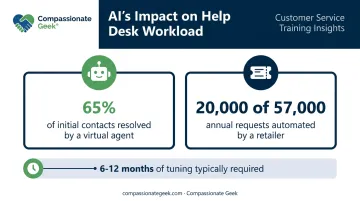
Those gains aren't instant, though. Forrester's research notes that organizations typically need six to twelve months of tuning, along with a solid knowledge base, before seeing results like that.
As routine work shifts to automation, what's left for human agents tends to be more complex, ambiguous, or emotionally charged. HDI's own research on AI in IT service management points out that automation lacks human emotional intelligence and empathy for handling nuanced, personal situations. In other words, the tickets that reach a human agent are exactly where soft skills matter most.
Frequently Asked Questions
What are common IT help desk tasks?
Core recurring tasks include ticket logging and prioritization, troubleshooting and resolution, escalation with proper handoffs, documentation, and ongoing user communication or training. These apply across most help desk environments, regardless of industry.
What is the difference between a help desk and IT support?
"Help desk" typically refers to the centralized, ticket-based function handling incoming requests. "IT support" is broader and can include desktop support, field technicians, and infrastructure teams working outside the ticketing system.
What skills do you need to work at an IT help desk?
You need a mix of technical skills, troubleshooting, OS familiarity, and ticketing tool proficiency, plus interpersonal skills like communication, patience, and active listening. Certifications like CompTIA A+ help but aren't always required for entry-level roles.
What are the three tiers of help desk support?
Support typically breaks down into three tiers:
- Tier 1 resolves common, entry-level issues like password resets
- Tier 2 handles escalated, more technical problems that need deeper system access
- Tier 3 tackles specialist or vendor-level issues requiring in-depth investigation
Is working at an IT help desk a good entry point into an IT career?
Yes. Tier 1 roles commonly serve as an entry point requiring minimal prior experience, with a clear path toward Tier 2, specialist positions, or management over time.
How is AI changing help desk responsibilities?
AI is absorbing routine, rule-based tasks like password resets and basic triage. This increases the importance of judgment, emotional intelligence, and complex problem-solving for the human technicians handling what's left.