Done well, scripts reduce agent stress, cut resolution time, and keep tone consistent across a hybrid human-plus-AI support environment. Done poorly, they make agents sound like robots reading from a manual.
HDI's State of Tech Support in 2025 survey found that 55% of support organizations struggled to find candidates with the necessary soft skills, compared to 39% citing hard-skill gaps — proof that empathy and communication are now treated as core competencies, not nice-to-haves. This guide breaks down the scripts every help desk needs heading into 2026.
TL;DR
- Help desk scripts are flexible frameworks built on competence plus compassion
- The best 2026 scripts blend technical accuracy with emotional intelligence across every ticket type
- This guide covers top script categories, selection criteria, and mistakes to avoid
- Refine scripts continuously through coaching and role-play, not as "set and forget" documents
Overview of Customer Service Scripts in Help Desk / IT Support
A help desk script differs from a generic customer service script because of the context it has to carry. Retail scripts handle returns and complaints. Help desk scripts have to work around ticketing systems, SLAs, escalation tiers, and technical jargon — all while the person on the other end may have already lost an hour of productivity to a broken system.
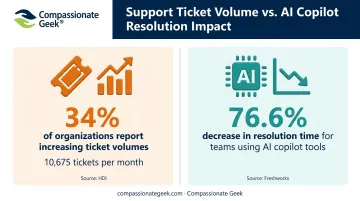
That complexity is compounding. HDI's 2025 survey of 115 industry leaders found 34% of technical-support organizations reported rising ticket volumes, with respondents processing an average of 10,675 tickets per month. At the same time, AI is reshaping how those tickets get handled before a human ever steps in.
Freshworks' 2025 benchmark, drawn from more than 187 million IT service tickets across 10,551 organizations, found that teams using AI copilot tools saw a 76.6% decrease in resolution time. That's vendor telemetry, not a universal guarantee, but it signals where the industry is heading: AI clears the routine noise, leaving agents to handle the harder, more human conversations.
That's exactly where scripts matter most. Below are the six categories every help desk should have ready for 2026.
Top Customer Service Scripts for Help Desks in 2026
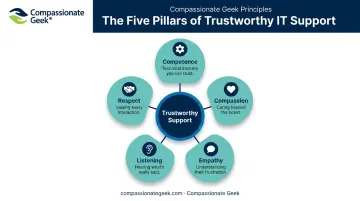
These scripts were selected using three filters: how often the scenario occurs, how emotionally charged it typically is, and how directly it connects to competence, compassion, empathy, listening, and respect, the five principles that anchor good IT customer service.
Script for Calming an Angry or Frustrated End User
This is the most common high-stakes scenario in any help desk queue. System downtime, fear of data loss, and missed deadlines turn ordinary tickets into emotional ones fast.
Sequencing makes the difference, not technical skill. Validating the emotion before diagnosing the problem separates a script that works from one that sounds robotic.
| Element | Detail |
|---|---|
| Sample Script Excerpt | "I understand why that's frustrating. Let's work through this together. Can you walk me through what happened right before the error appeared?" |
| Why It Works | Naming the emotion defuses tension before problem-solving even starts. The user feels heard, not processed, which lowers defensiveness and makes them easier to work with. |
| Common Mistake to Avoid | Jumping straight to "have you tried restarting it?" without acknowledging the frustration first. |
Script for a Recurring Ticket ("I've Called About This Three Times")
Repeat tickets erode trust faster than almost any other scenario. They also drag down first-contact resolution, a metric Freshworks' global benchmark pegs at 74.14% average FCR across the industry.
Ownership language and visible history-checking rebuild credibility quickly. The user needs proof you're not starting from zero.
| Element | Detail |
|---|---|
| Sample Script Excerpt | "I can see this is your third call about this issue. I'm sorry it's still not fixed. I've pulled up the full history, so you won't need to repeat anything. Here's what I'm doing differently this time." |
| Why It Works | Proving continuity restores trust. The user isn't forced to relive the problem, which signals the team actually tracks its own work. |
| Common Mistake to Avoid | Asking the user to re-explain the issue from scratch. |
A note on repeat tickets: HDI's 2026 analysis warns that measuring analysts mainly on tickets closed, rather than tickets resolved, encourages speed over completeness, which drives up reopen rates and escalations. Scripts should treat resolution, not closure, as the real goal.
Script for Escalating to Tier 2 or a Specialist
Handoffs are where trust breaks in tiered support structures. The user senses they're being "passed around," and that feeling sticks even if the eventual fix is solid.
Context transfer and expectation-setting, done before the handoff, prevent that feeling entirely.
| Element | Detail |
|---|---|
| Sample Script Excerpt | "I'm bringing in a colleague who specializes in this exact issue. I've already briefed them on everything you've told me, so you won't have to repeat it. They'll be in touch within 30 minutes." |
| Why It Works | Proactive context-sharing eliminates the need for the user to re-explain their problem to a stranger, which is the core source of escalation frustration. |
| Common Mistake to Avoid | Cold-transferring without briefing the next agent or setting a timeframe with the customer. |
Script for an SLA Breach or Resolution Delay
Delays are inevitable in IT support; vendor dependencies and complex bugs guarantee it. What matters is transparency, not perfection.
Silence is the enemy of trust. When customers don't hear from you, they fill the gap with their own story, and it's rarely a generous one.
| Element | Detail |
|---|---|
| Sample Script Excerpt | "I've found the cause: the file is corrupted and needs to be restored from backup. That could take up to 90 minutes. I'll send you an update at the 45-minute mark either way." |
| Why It Works | Specificity (a cause, a timeframe, a named checkpoint) reduces anxiety far more than a generic apology. It turns uncertainty into a visible process. |
| Common Mistake to Avoid | Using vague language like "it should be resolved soon" instead of committing to a concrete next update. |
The Service Desk Institute's global standard backs this up structurally: it requires status changes to be monitored and communicated throughout a ticket's lifecycle, not just at the start and end.
Script for Closing a Ticket and Confirming Resolution
The closing interaction determines whether a customer feels genuinely helped or simply processed. Get this wrong, and you risk a reopened ticket.
| Element | Detail |
|---|---|
| Sample Script Excerpt | "Here's a quick recap: we identified the corrupted file, restored it from backup, and your system is now running normally. Is everything working the way you'd expect? Reach out anytime if it happens again." |
| Why It Works | Summarizing the fix and inviting follow-up gives the user a clear confirmation point, reducing the odds they'll need to call back for the same issue. |
| Common Mistake to Avoid | Closing the ticket without confirming the user is actually satisfied. |
The SDI standard explicitly defines closure as changing a ticket's status only when the customer confirms the incident is resolved, not when the agent thinks it's fixed.
How We Chose (and Built) These Help Desk Scripts
The biggest mistake teams make is treating scripts as rigid, word-for-word lines instead of adaptable frameworks. A script should give agents a starting shape for the conversation, not a script they read like a phone tree.
Every scenario above was evaluated through one lens: the balance of competence and compassion.
- A technically accurate response that ignores emotion feels cold and mechanical
- An empathetic response that stays vague on the fix feels hollow and unhelpful
- Neither one, on its own, earns trust
Channel adaptability matters too. A phone script needs warmth in tone and pacing, while a chat script needs brevity without sounding curt.
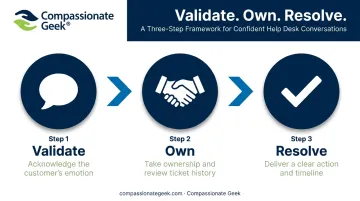
An email or ticket update needs structure the user can scan quickly. The underlying message stays the same (validate, own, resolve), but the delivery shifts by medium.
Beyond channel and tone, deciding which scenarios made this list came down to frequency and emotional intensity, then tying each one back to outcomes that actually move the needle: CSAT, first-contact resolution, and reopen rates.
This mirrors the same evaluation lens Don Crawley uses in the Compassionate Geek framework — five core principles (Competence, Compassion, Empathy, Listening, Respect) that give teams a repeatable way to build and audit scripts instead of guessing.
Common Mistakes Help Desks Make With Scripts
Even well-written scripts fail when they're used the wrong way. Watch for these three patterns:
- Reading verbatim in a flat tone. Monotone delivery without natural inflection makes support feel robotic, and callers notice instantly.
- Skipping the emotional acknowledgment. Jumping straight to a technical fix before recognizing frustration or urgency undoes the entire purpose of having a script in the first place.
- Never updating the script. Scripts that skip QA feedback and new ticket trends go stale fast, missing 2026's mix of AI-triaged and human-escalated issues.
Conclusion
The best help desk scripts in 2026 balance technical precision with genuine human connection. A script that solves the problem but ignores the person behind it will always fall short.
Treat these frameworks as training scaffolding, not static documents. Refine them through regular role-play, QA coaching, and real feedback from your queue.
Compassionate Geek's online IT customer service training builds exactly this kind of habit. Through structured role-play and the five core principles, teams move past memorized lines toward support that's both competent and genuinely compassionate.
Frequently Asked Questions
What is the angry customer script?
It's a flexible response framework that guides you to acknowledge the emotion, take ownership, explain briefly, then resolve with a clear action and timeline.
What phrases calm angry customers?
Try patterns like "I can see why that's frustrating" or "Let me take ownership of this right now." Adapt these patterns to fit each situation instead of memorizing them word-for-word.
How do I write a customer service script for a help desk?
Start by mapping your most common ticket scenarios. Then draft flexible language around three moves for each: validation, ownership, and resolution.
Should IT support agents always follow scripts word-for-word?
No. Scripts should adapt to the user's tone and specific situation. Reading them verbatim is what makes agents sound robotic instead of genuine.
What's the difference between a script and a call flow in help desk support?
A call flow is the structural sequence of steps in an interaction. A script provides the language and tone used within each of those steps.
How can I train my help desk team to use these scripts naturally?
Use paired role-play with real scenarios, followed by structured debriefs and a second attempt. Combine this with QA coaching and the five core principles to build lasting habits.