Introduction
A customer calls in, already frustrated. Their password won't reset, they've tried three times, and they're on the verge of hanging up.
The agent who answers has two choices: recite a script in a flat, mechanical tone, or use that same script as a foundation for a real conversation.
That difference determines whether the caller feels helped or dismissed.
IT support brings its own complications. Technical complexity, wildly mixed customer expertise, and constant time pressure make scripts genuinely useful. But only if they don't sound canned or uncaring.
This guide covers the anatomy of a great help desk script and ready-to-use examples for common IT scenarios. You'll also learn the mistakes that make scripts sound robotic and how to train agents to deliver them with real compassion.
Key Takeaways
- Effective scripts blend structure with a natural, empathetic tone
- Every effective script flows through greeting, discovery, empathy, and resolution
- Canned responses, scripts, and frameworks each serve a distinct purpose
- Scripts work best as flexible guides, not rigid word-for-word rules
- Training on the "why" behind each line beats memorization every time
What Are Help Desk Scripts and Why They Matter
A help desk script is the structured dialogue and set of actions an agent follows during a call or chat to handle an issue consistently and efficiently.
It functions more like a map than a theatrical script, keeping agents oriented while letting them respond naturally to the person in front of them.
Scripts get confused with two related tools that actually serve different purposes:
| Tool | What it is | When to use it |
|---|---|---|
| Help desk script | Full conversational flow for a live call or chat | Guiding an entire interaction start to finish |
| Canned response | A pre-written text snippet for a ticket or chat message | Answering a repetitive question quickly, then personalizing it |
| Conversation framework | Flexible principles for tone and judgment | Guiding how an agent talks, not exactly what they say |
Mixing these up is common. A canned response dropped into a live phone call sounds stiff. A rigid script applied to every ticket ignores nuance the situation demands.
The real payoff of good scripting
Scripts done well speed up resolution, shrink the ramp-up time for new hires, and keep the customer experience consistent across a whole team.
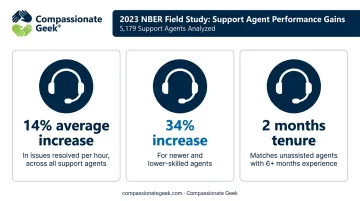
A 2023 NBER field study of 5,179 technical support agents found that editable, real-time reply guidance increased issues resolved per hour:
- 14% on average across all agents
- 34% for newer or lower-skilled agents
- Agents with just two months of tenure matched unassisted agents with six-plus months on the job
That's strong evidence for flexible, in-the-moment guidance rather than rigid recitation.
Compassionate Geek's founder, Don R. Crawley, built his entire training philosophy around one idea: IT work is about solving human problems through technology, not just fixing machines.
A script only earns trust when it's built on five principles: Competence, Compassion, Empathy, Listening, and Respect. Skip those, and you get a script that sounds nice on paper but falls flat on the phone.
Over-script an agent and they stop listening. They just recite. And the moment a customer feels like they're talking to a machine, the consistency scripts were supposed to deliver disappears anyway.
The Essential Structure of a Great IT Help Desk Script
Every effective IT support script—whether for phone, chat, or email—is built on six key steps: greeting, identity verification, issue discovery, empathy, resolution, and closing.
Opening with a Consistent, Warm Greeting
The greeting sets the tone for everything that follows. Keep it short and human:
- "Thank you for calling [Company] IT Support, this is [Agent Name]. How can I help you today?"
- "Hi, this is [Agent Name] from the help desk. What can I fix for you?"
Verifying the Caller's Identity
Before touching anything sensitive, confirm who you're talking to:
Agent: "Before we get started, can I get your name and employee ID? I just want to pull up the right account."
Discovering the Issue with the 5 Ws and 1 H
Vague issue descriptions ("it's broken," "the internet doesn't work") need structure. The 5 Ws and 1 H is a simple framework that helps agents ask targeted follow-up questions to understand the problem quickly:
- What exactly is happening? "Can you describe what's on your screen?"
- When did it start? "Was this working yesterday?"
- Where does it happen? "Is this on your laptop or a specific application?"
Showing Empathy Before Jumping to a Fix
Don't rush to the solution. Acknowledge the person first:
- "I understand why that's frustrating, especially with a deadline today. Let's get this sorted."
- "That sounds like it's really slowed you down. I'll walk through this with you step by step."
Resolving the Issue or Escalating Clearly
If you can fix it, say so plainly. If not, be upfront:
"I've got a couple of options I can try right now that should resolve this." Or: "This needs a specialist on our networking team. I'm going to get you to someone who handles this every day, and I'll make sure they have your details already."
Closing the Interaction
Confirm the fix, invite more questions, and use the customer's name:
"You're all set, Maria. Is there anything else I can help with today? Thanks for your patience, and don't hesitate to call back if it acts up again."
Help Desk Script Examples for Common Customer Service Scenarios
These scripts cover six scenarios every help desk faces, from password resets to closing a ticket with a feedback request.
Password Reset or Account Access Request
Agent: "Thanks for calling IT Support, this is Jordan. How can I help?" Customer: "I'm locked out of my account." Agent: "No problem, let's get you back in. Can I confirm your name and employee ID first?" [verifies] "Great, I'm sending a reset link to your registered email now. Let me know once it lands."
Network or Connectivity Troubleshooting
Agent: "Let's check a few things together. Can you look at the bottom right of your screen and tell me if you see a Wi-Fi icon?" [customer responds] "Perfect, now try restarting your router. I'll stay on the line while that reboots."
Checking in at each step keeps the customer engaged instead of feeling like they're troubleshooting alone.
Escalating a Ticket to Tier 2 or a Specialist
Generic version:
"This needs a closer look from our specialist team. I'm escalating it now and someone will follow up soon."
Better, specific version:
"This is a server-side issue, so I'm escalating it to our infrastructure team. They typically follow up within one business day. I've noted everything we discussed so you won't have to repeat it."
Setting a realistic timeframe, rather than a vague promise, prevents a second frustrated call later.
Handling an Angry or Frustrated Customer
"I hear you, this has been going on too long, and that's not okay. Let me take ownership of this right now and figure out what's happening."
Validate first. Solve second.
Apologizing for a Mistake, Delay, or Missed SLA
"I'm sorry we missed the timeline we promised. That's on us. Here's exactly what I'm doing to fix it right now."
One sincere sentence beats three apologetic ones.
Closing a Ticket and Requesting Feedback
"Just to confirm, we resolved the login issue by resetting your credentials. Anything else before I close this out? We'd love a quick rating on how this went. It helps us improve."
A specific recap plus a feedback ask closes the loop and puts Compassionate Geek's core principles of competence and compassion into practice.
Common Mistakes That Make Help Desk Scripts Sound Robotic
Reading a script word-for-word in a flat tone is the fastest way to erode trust. Customers can hear the difference between a person thinking and a person reciting.
Other frequent missteps:
- Skipping empathy when rushed. Cutting the acknowledgment step to save ten seconds is often what separates a "fine" call from a genuinely good one.
- Leaning on dead-end phrases. Zendesk's customer service guidance notes that phrases like "I don't know" and "that's not my job" damage trust instantly.
- Using hollow empathy lines. Phrases like "I know how you feel" can feel dismissive, especially when followed immediately by a canned fix.
Swap dead-end phrases for solution-focused language:
| Instead of | Try |
|---|---|
| "I don't know" | "Let me find that out for you" |
| "That's not my job" | "Let me connect you with the right person" |
| "No, we can't do that" | "Here's what we can do instead" |
Training Your Team to Use Scripts with Compassion, Not Just Compliance
The best IT support teams train agents to understand why each part of a script exists, not to memorize it line by line. Role-play and real call reviews build natural delivery far better than a printed sheet ever will.
Scripts also need to flex. A caller who's clearly technical needs a different pace than someone who's never opened a support ticket before. That flexibility requires ongoing coaching in active listening and emotional intelligence, not just periodic script updates.
This is where Compassionate Geek's training programs fit in. The IT Customer Service Training course combines technical script frameworks with the five core principles, Competence, Compassion, Empathy, Listening, and Respect, delivered through an on-demand global portal and virtual sessions.
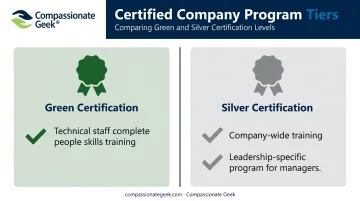
The Compassionate Geek Certified Company program takes this further, with two certification tiers:
- Green Certification: Requires all technical staff to complete people skills training.
- Silver Certification: Extends that training to the entire company, plus a leadership-specific program for managers.
Both levels actively discourage rigid script recitation in favor of real skill-building.
Drayton Mayers, President of TeamLogic IT East Memphis, requires every employee to complete this training. He credits it directly with winning new business: clients often leave competitors over poor service, then choose his team for the mix of technical skill and genuine compassion.
Frequently Asked Questions
What is a good customer service conversation?
A good conversation combines active listening, a clear resolution path, and genuine empathy. It follows the greeting-to-closing structure from this guide, adapted naturally to each caller.
What is the 10/5/3 rule in customer service?
This hospitality and retail practice means acknowledging customers at 10 feet, smiling at 5 feet, and greeting them at 3 feet. Some teams borrow it loosely for response timing, but it isn't a formal IT standard.
What are some script chat examples?
Chat scripts follow the same greeting, discovery, empathy, resolution, closing structure as phone scripts, just written for text. The password reset and escalation examples above work equally well typed as spoken.
What is the difference between a canned response and a call script?
A canned response is a pre-written text snippet used in tickets or chat. A call script guides the full flow and tone of a live conversation, from greeting through closing.
How do you write a good IT help desk script?
Structure it around greeting, verification, discovery, empathy, resolution, and closing. Use plain language instead of technical jargon, and leave room for agents to adapt naturally.
Should agents always follow the script word-for-word?
No. Scripts work best as flexible frameworks agents adapt to the caller's tone, expertise, and mood, not rigid text recited verbatim.