Introduction
Picture this: a technician spends 45 minutes flawlessly fixing a server issue, then ends the call with "yeah, it was a DNS problem, should be fine now" and hangs up. The fix was perfect. The customer still feels dismissed, confused, and unlikely to call back with confidence.
This gap between technical skill and human connection costs real money. 23% of small and medium-sized businesses say they'd leave their IT provider over service-quality issues alone, according to Action1's 2022 SMB IT Security Needs Report, which surveyed 750 companies worldwide.
This guide draws on Don R. Crawley's Compassionate Geek philosophy: five principles (Competence, Compassion, Empathy, Listening, and Respect) paired with practical habits any IT professional can start using today.
Key Takeaways
- Technical skill and soft skills work together to deliver great IT service
- The 5 Core Principles give teams a shared, memorable framework for building user trust
- Small habits like active listening and plain-language explanations drive outsized satisfaction gains
- Structured training turns good instincts into consistent, team-wide behavior
What Is Customer Service for IT Professionals?
IT customer service is the practice of supporting people, coworkers, end-users, or paying clients, through technology problems. Whether you work an internal help desk or for a managed service provider (MSP), your "customer" is anyone waiting on you to fix something they can't fix themselves.
That support happens across several channels, and each one demands a different tone:
- Phone/help desk: real-time, voice-driven, highest opportunity for reassurance
- Email or ticketing systems: written, easy to misread tone, needs extra clarity
- Live chat: fast-paced, casual, but still professional
- Self-service knowledge bases: no human interaction, so clarity has to do all the work
Why the Stakes Are Higher Than Retail
A slow checkout line is annoying. A down server is a business emergency. Outages don't just inconvenience people; they threaten deadlines, revenue, and sometimes security.
The numbers back this up. According to the Uptime Institute's 2024 Annual Outage Analysis, 54% of organizations reported their most recent significant outage cost more than $100,000, and 16% said it exceeded $1 million.
That financial pressure trickles down to whoever answers the phone. Users aren't just frustrated by a glitch; they're anxious about what it means for their job.
The 5 Core Principles of Compassionate IT Customer Service
Don Crawley built the Compassionate Geek framework on a simple belief: IT work is about solving human problems, not just fixing machines. Five principles carry that idea into daily practice.
Competence
Nothing else on this list matters if you can't solve the problem. Users trust technicians who know their craft. But competence alone doesn't create a good experience—it's the entry ticket, not the whole show. Pair it with the four principles below and you get a service experience people actually remember well.
Compassion
A "minor" printer jam might be nothing to you. To the user who's already had a rough morning, it can feel like a crisis. Compassion means recognizing that emotional weight and adjusting your tone and urgency accordingly, even when the fix itself takes thirty seconds.
Empathy
Empathy goes one step further than compassion. It's actively imagining what the user feels: the deadline pressure, the fear of losing hours of work, the embarrassment of "breaking" something. You don't have to agree with their reaction. You do have to understand it, and let that understanding shape how you respond.
Listening
Active listening does double duty. It helps you diagnose the actual problem faster, and it makes the user feel heard. That means:
- Paraphrasing what you heard before offering a fix
- Asking clarifying questions instead of assuming
- Confirming understanding out loud ("So this started after the update, is that right?")
Respect
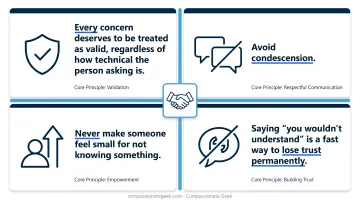
Every concern deserves to be treated as valid, regardless of how technical the person asking is. Avoid condescension. Never make someone feel small for not knowing something. Saying "you wouldn't understand" is a fast way to lose trust permanently.
Best Practices for Delivering Excellent IT Customer Service
These five habits translate the principles above into repeatable, everyday behavior.
Listen Carefully and Ask the Right Questions
Open-ended, probing questions speed up diagnosis and cut down on frustrating back-and-forth. Instead of guessing, ask:
- "What exactly happens when you click that button?"
- "Can you send me a screenshot of the error?"
- "When did you first notice this happening?"
The Service Desk Institute notes that active listening supports more effective needs analysis, faster resolution, and reduced stress on both sides of the conversation.
Translate Technical Jargon into Plain Language
Compare these two responses to the same issue:
- Jargon: "There's a latency issue with the DNS server."
- Plain language: "Your computer is having trouble finding websites quickly. I'm fixing the settings now, it'll be back to normal in a few minutes."
The second version builds confidence and cuts down repeat calls, because the user actually understands what happened.
Set Clear Expectations and Communicate Proactively
Compare these two responses to the same request for a status update:
- Vague: "We're working on it."
- Specific: "I've identified the issue, it's a licensing conflict. I expect it resolved within the hour and I'll update you at 2 PM either way."
Specific timelines, even rough ones, reduce anxiety and cut down on repeat check-in calls.
Take Ownership and Follow Through to Resolution
Ownership doesn't end when you hand a ticket to another team. It means staying accountable through escalation and confirming the fix actually worked, rather than closing a ticket and hoping for the best. A simple "Does that solve it? Is everything working okay now?" prevents a huge share of repeat contacts.
Stay Patient, Positive, and Mindful of Tone
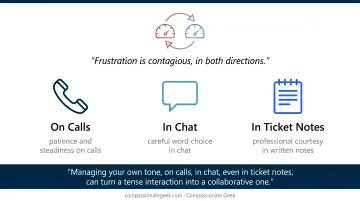
Frustration is contagious, in both directions. Managing your own tone, on calls, in chat, even in ticket notes, can turn a tense interaction into a collaborative one.
Navigating Difficult Situations and Common Challenges
Difficult conversations follow a predictable pattern, and a simple sequence handles most of them:
- Acknowledge the frustration first. Say "I understand why that's frustrating" before jumping to a solution.
- Let them fully vent without interrupting or getting defensive.
- Offer a clear action plan with a realistic timeline, not a vague promise.
Beyond that core sequence, IT support carries its own unique friction points:
- Jargon overload confuses rather than clarifies
- Tone gets misread easily in email and chat, where there's no voice inflection to soften a message
- Users often underestimate how long complex fixes actually take
Escalating Without Losing Trust
Even after addressing these friction points, some issues will exceed your scope. When that happens, escalate deliberately rather than letting frustration build:
- Document the steps already tried
- Gather relevant context (error messages, timestamps, affected systems)
- Loop in a manager or specialist with a clear summary, not just "this is broken."
This keeps the user informed and prevents the classic support failure: reopening the same conversation three times because nobody wrote anything down.
Measuring Success: Key Metrics for IT Customer Service
Numbers tell part of the story. Three KPIs dominate IT service measurement:
| Metric | What It Measures | Benchmark |
|---|---|---|
| First Contact Resolution (FCR) | % of issues solved on first contact | 60-70% industry average |
| Average Handling Time (AHT) | Time spent per interaction | 4-6 min (simple), 20+ min (complex) |
| CSAT/NPS | Satisfaction and likelihood to recommend | CSAT ~73-86%; NPS 50+ considered excellent |
Source: HDI's Metrics That Are Valuable to IT Service Centers.
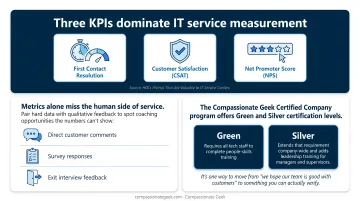
Metrics alone miss the human side of service. Pair hard data with qualitative feedback to spot coaching opportunities the numbers can't show:
- Direct customer comments
- Survey responses
- Exit interview feedback
This is exactly why some organizations formalize their approach through structured training and recognition. The Compassionate Geek Certified Company program offers structured recognition for organizations that complete this training and commit to sustaining it over time. It's one way to move from 'we hope our team is good with customers' to something you can actually verify.
Frequently Asked Questions
What is customer service in information technology?
It's the support and solutions IT professionals deliver to internal or external "customers," coworkers, end-users, or clients. It requires both technical skill and interpersonal ability to work well.
What are the 4 types of customer service?
In IT, the main channels are phone/help desk, email or ticketing systems, live chat, and self-service knowledge bases. Each requires a slightly different communication style and pace.
What are the 7 qualities of good customer service?
Patience, clear communication, empathy, technical knowledge, responsiveness, problem-solving, and follow-through top the list. These map closely onto the five Compassionate Geek principles of competence, compassion, empathy, listening, and respect.
What is 24/7 technical support?
Round-the-clock IT support availability, often staffed through shift schedules, on-call rotations, or "follow-the-sun" models across time zones. It matters because outages don't wait for business hours.
How can IT professionals improve their customer service skills?
Deliberate practice, honest feedback, and structured training build lasting soft-skill habits. Programs like Compassionate Geek's IT customer service courses give teams a shared framework rather than leaving it to chance.
What is the difference between customer service and technical support in IT?
Technical support solves the specific problem, the broken printer, the frozen app. Customer service is the overall communication and experience around that resolution, including tone, clarity, and follow-up.